WSL-related Registry: A small dive
---date: Jul 19, 2020
tags:
- WSL
- WSL2
language: English
---
Due to the lack of documentation, some of the information is possibly not complete or inaccurate. This is a updated version since WSLConf 2020.
Information of WSL distributions store here: HKEY_CURRENT_USER\SOFTWARE\Microsoft\Windows\CurrentVersion\Lxss.
Overview

- Subkeys are the definition of single WSL distributions. They are named using GUID.
DafaultDistribution, RGE_SZ: This defines the default distribution used when usingbash.exeandwsl.exe. The value passed is a GUID. By default, it’s the first distribution installed.DefaultVersion, REG_DWORD: (WSL2 Only) This defines the default WSL version that would be used for new WSL distributions. Value for WSL1 is 0x1(1); for WSL2, 0x2(2).
Store Distribution Key

Here are the details of the key values:
BasePath, REG_SZ: This defines where the WSL distribution source location is.DefaultEnvironment, REG_MULTI_SZ: This defines the default environment value that passed to WSL Distribution when opening the WSL distribution.DefaultUid, REG_DWORD: This defines the default user for the distro. The value uses theuidin Linux, for example,rootis always0.DistributionName, REG_SZ: This defines the registered name of the WSL distribution. This will be used inwsl.exe --listand inwsl.exe -d.Flags, REG_DWORD: This defines the behavior of a distribution registered with the Windows Subsystem for Linux. The value passed is numeral combination of enumerationWSL_DISTRIBUTION_FLAGS, which is used by functionWslConfigureDistributioninwslapi.h. The default value isWSL_DISTRIBUTION_FLAGS_DEFAULT, which is 0x7(7) in older version and 0xf(15) in newer version. Known available single options are the following:-
WSL_DISTRIBUTION_FLAGS_NONE: 0x0(0) -
WSL_DISTRIBUTION_FLAGS_ENABLE_INTEROP: 0x1(1) -
WSL_DISTRIBUTION_FLAGS_APPEND_NT_PATH: 0x2(2) -
WSL_DISTRIBUTION_FLAGS_ENABLE_DRIVE_MOUNTING: 0x4(4)There is also one undocumented flag with value 0x8(8) in the newer version, which defines which WSL version it is using. With the flag, the distro will be using WSL2.
-
KernelCommandLine, REG_SZ: (2004 Only) This defines the command passed to WSL2 Kernel.PackageFamilyName, REG_SZ: This defines the WSL distribution’s UWP package Family name.State, REG_DWORD: This defines the state of WSL distribution. By default, it is in normal state 0x1(1). Here are also some other states:- Normal: 0x1(1)
- Installing: 0x3(3)
- Uninstalling: 0x4(4)
Version, REG_DWORD: Do not confuse this withDefaultVersion! They define two entire different settings. This defines whether you are usingwslfsorlxfsfor the filesystem. Value forlxfsis 0x1(1); forwslfs, 0x2(2).
Imported Distribution Key
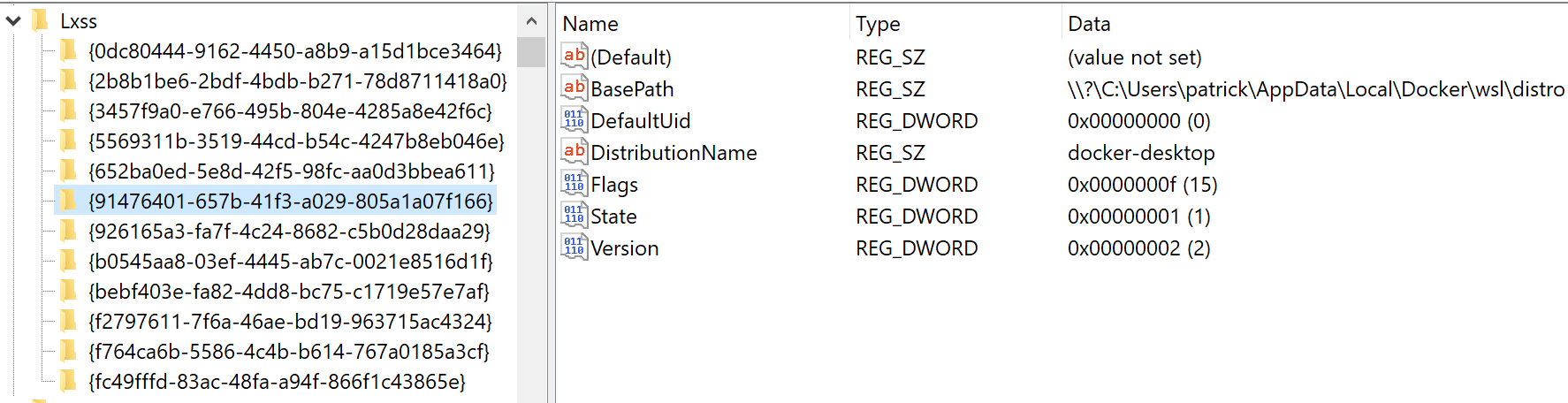
As you can see, by default imported distribution do not have DefaultEnvironment, KernelCommandLine and PackageFamilyName. Also by default, DefaultUid will be 0 which is root.

