<?xml version="1.0" encoding="utf-8"?>
<feed xmlns="http://www.w3.org/2005/Atom">
  <title>Patrick Wu&#39;s Space</title>
  
  
  <link href="https://patrickwu.space/atom.xml" rel="self"/>
  
  <link href="https://patrickwu.space/"/>
  <updated>2026-02-07T05:53:40.000Z</updated>
  <id>https://patrickwu.space/</id>
  
  <author>
    <name>Patrick Wu</name>
    
  </author>
  
  <generator uri="https://hexo.io/">Hexo</generator>
  
  <entry>
    <title>如何在 Fedora 上正確設定 Neko Project II Kai 來玩 PC-98 遊戲</title>
    <link href="https://patrickwu.space/2026/02/02/linux-pc98-cn/"/>
    <id>https://patrickwu.space/2026/02/02/linux-pc98-cn/</id>
    <published>2026-02-02T15:56:11.000Z</published>
    <updated>2026-02-07T05:53:40.000Z</updated>
    
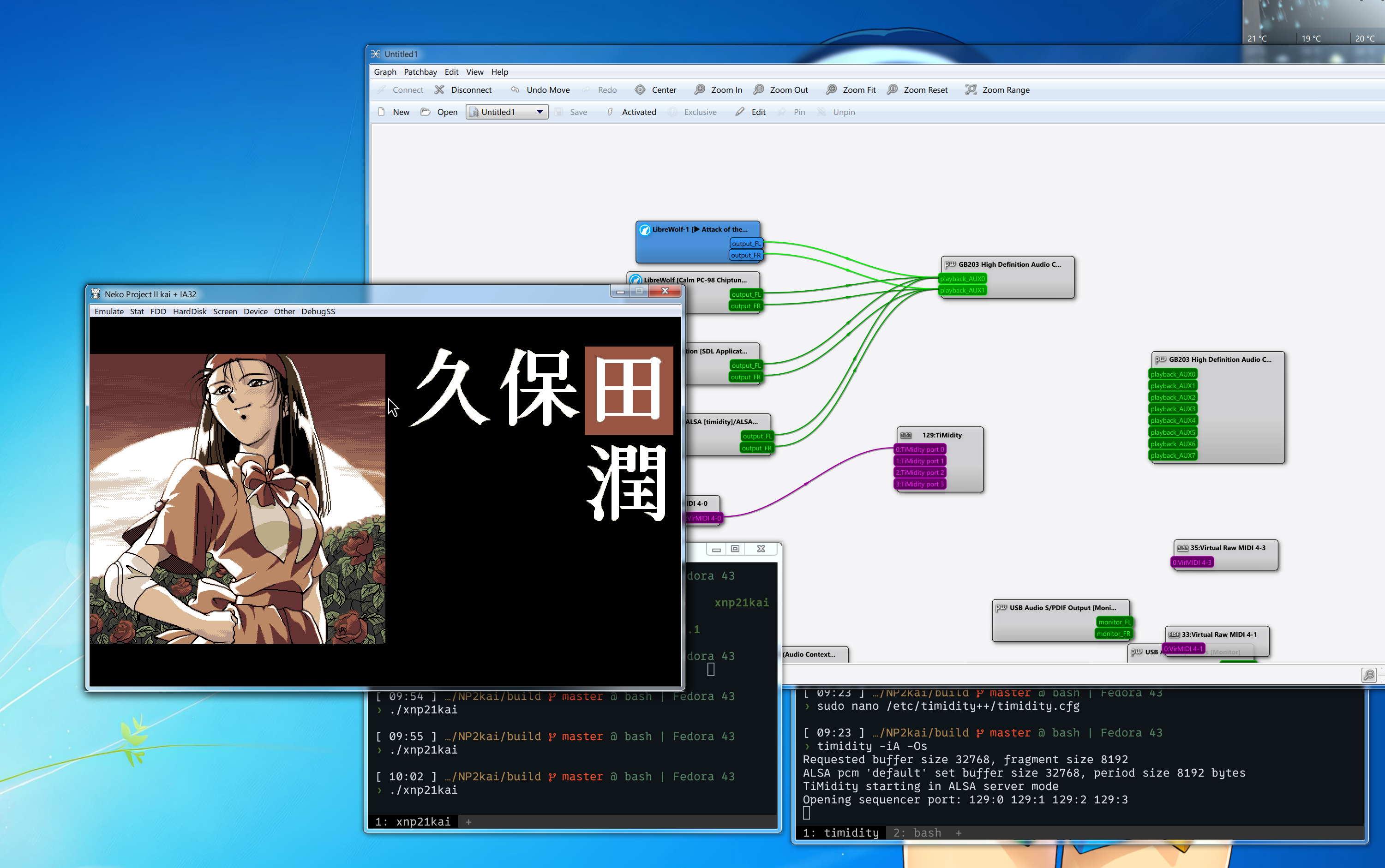
    <content type="html"><![CDATA[<h2 id="聲音在哪裡">聲音在哪裡</h2><p>前段時間突然很想玩 PC-98 遊戲，所以從網際網路上找了一些 PC-98 遊戲，然後參考各種建議後準備使用 RetroArch 內建版的 Neko Project II Kai。 我先試了 Steam 版，結果發現它所有的核心都被移除了，應該是考慮 Steam 上架的原因；然後我試了 Flatpak 版，這個版本有 Neko Project II Kai 的核心，也能載入我下載的遊戲，但不管我怎麼試都沒聲音。</p><p>搞了一陣子之後，我決定直接編譯原版的 Neko Project II Kai。我聽說它比 <code>libretro</code> (RetroArch) 版要更好，也修復了更多問題。但即使編譯完也還是沒聲音。 並且 GitHub 頁面上的設定指南似乎也只針對 Ubuntu，所以我只好自己摸索了一陣才終於讓它在 Fedora 上動起來：</p><p><figure class="image-caption"><img src="https://cdn.patrickwu.space/posts/pc98.png" alt="「VG II 姫神舞闘譚」在Neko Project II Kai 上運作"><figcaption>「VG II 姫神舞闘譚」在Neko Project II Kai 上運作</figcaption></figure></p><p>我當時想，啊，快速的寫一篇關於 PC-98 音訊設定的文章就完工了，結果當我開始寫的時候愈來愈長，然後… 就變成一份在 Fedora 上設定 Neko Project II Kai 的完整指南了… 就這樣了(笑）</p><h2 id="安裝-Neko-Project-II-Kai">安裝 Neko Project II Kai</h2><p><strong>重要：</strong> 不要安裝 <code>libretro</code> 版本！請使用這個版本：<a href="https://github.com/AZO234/NP2kai">https://github.com/AZO234/NP2kai</a></p><h3 id="安裝依賴項">安裝依賴項</h3><figure class="highlight bash"><table><tr><td class="gutter"><pre><span class="line">1</span><br><span class="line">2</span><br></pre></td><td class="code"><pre><span class="line"><span class="built_in">sudo</span> dnf group install <span class="string">&quot;development-tools&quot;</span></span><br><span class="line"><span class="built_in">sudo</span> dnf install gcc-c++ cmake ninja-build nasm /usr/lib64/libusb.so SDL-devel SDL_mixer-devel SDL_ttf-devel SDL2-devel SDL2_mixer-devel SDL2_ttf-devel gtk2-devel libX11-devel fontconfig-devel freetype-devel</span><br></pre></td></tr></table></figure><h3 id="編譯模擬器">編譯模擬器</h3><p>導航到 <code>NP2kai</code> 資料夾並編譯：</p><figure class="highlight plaintext"><table><tr><td class="gutter"><pre><span class="line">1</span><br><span class="line">2</span><br><span class="line">3</span><br><span class="line">4</span><br></pre></td><td class="code"><pre><span class="line">mkdir build</span><br><span class="line">cd build</span><br><span class="line">cmake .. -D</span><br><span class="line">make -j</span><br></pre></td></tr></table></figure><p>你可以選擇用 <code>sudo make install</code> 全域安裝，或者直接於 <code>build</code> 資料夾運行 <code>./xnp21kai</code>。</p><h3 id="設定-BIOS-檔案">設定 BIOS 檔案</h3><p>啟動模擬器之前，先建立設定資料夾：</p><figure class="highlight bash"><table><tr><td class="gutter"><pre><span class="line">1</span><br></pre></td><td class="code"><pre><span class="line"><span class="built_in">mkdir</span> -p ~/.config/xnp21kai</span><br></pre></td></tr></table></figure><p>然後從 <a href="https://github.com/Abdess/retroarch_system/tree/libretro/NEC%20-%20PC-98">這個 Git 資料夾</a> 下載所需的 BIOS 檔案，並將它們放在 <code>~/.config/xnp21kai</code>。</p><h2 id="MIDI-時間">MIDI 時間</h2><p>儲存庫有一個 <a href="https://github.com/AZO234/NP2kai?tab=readme-ov-file#midi-sound-x11">MIDI 設定指南</a>，但它主要針對 Ubuntu，而且我有些看不懂。經過一番研究，我發現音訊應該是這樣運作的：</p><figure class="highlight plaintext"><table><tr><td class="gutter"><pre><span class="line">1</span><br></pre></td><td class="code"><pre><span class="line">NP2kai → snd-virmidi → timidity++ → ALSA → PipeWire/wireplumber</span><br></pre></td></tr></table></figure><p>接下來我會一步一步說明如何配置。</p><h3 id="設定-TiMidity">設定 TiMidity++</h3><p>首先，安裝所需的套件：</p><figure class="highlight bash"><table><tr><td class="gutter"><pre><span class="line">1</span><br></pre></td><td class="code"><pre><span class="line"><span class="built_in">sudo</span> dnf install timidity++ fluid-soundfont-gm pipewire-alsa</span><br></pre></td></tr></table></figure><p>在 <code>/etc/timidity++/timidity.cfg</code> 建立 TiMidity++ 設定檔（如果需要，請建立目錄）並加入這行：</p><figure class="highlight plaintext"><table><tr><td class="gutter"><pre><span class="line">1</span><br></pre></td><td class="code"><pre><span class="line">soundfont /usr/share/soundfonts/FluidR3_GM.sf2</span><br></pre></td></tr></table></figure><p>由於 Fedora 預設不包含 TiMidity++ 服務，你可以透過建立 <code>~/.config/systemd/user/timidity.service</code> 來建立一個 systemd 服務：</p><figure class="highlight ini"><table><tr><td class="gutter"><pre><span class="line">1</span><br><span class="line">2</span><br><span class="line">3</span><br><span class="line">4</span><br><span class="line">5</span><br><span class="line">6</span><br><span class="line">7</span><br><span class="line">8</span><br><span class="line">9</span><br><span class="line">10</span><br></pre></td><td class="code"><pre><span class="line"><span class="section">[Unit]</span></span><br><span class="line"><span class="attr">Description</span>=TiMidity++ ALSA sequencer</span><br><span class="line"><span class="attr">After</span>=sound.target</span><br><span class="line"></span><br><span class="line"><span class="section">[Service]</span></span><br><span class="line"><span class="attr">ExecStart</span>=/usr/bin/timidity -iA -B2,<span class="number">8</span> -Os</span><br><span class="line"><span class="attr">Restart</span>=<span class="literal">on</span>-failure</span><br><span class="line"></span><br><span class="line"><span class="section">[Install]</span></span><br><span class="line"><span class="attr">WantedBy</span>=default.target</span><br></pre></td></tr></table></figure><p>然後啟用並啟動服務：</p><figure class="highlight bash"><table><tr><td class="gutter"><pre><span class="line">1</span><br></pre></td><td class="code"><pre><span class="line">systemctl --user <span class="built_in">enable</span> --now timidity.service</span><br></pre></td></tr></table></figure><p>或者直接手動運行：</p><figure class="highlight bash"><table><tr><td class="gutter"><pre><span class="line">1</span><br></pre></td><td class="code"><pre><span class="line">timidity -iA -B2,8 -Os &amp;</span><br></pre></td></tr></table></figure><p>透過檢查 ALSA 連接來驗證 TiMidity++ 是否正在運行：</p><figure class="highlight bash"><table><tr><td class="gutter"><pre><span class="line">1</span><br></pre></td><td class="code"><pre><span class="line">aconnect -l</span><br></pre></td></tr></table></figure><p>你應該會看到類似這樣的內容：</p><figure class="highlight plaintext"><table><tr><td class="gutter"><pre><span class="line">1</span><br><span class="line">2</span><br><span class="line">3</span><br><span class="line">4</span><br><span class="line">5</span><br></pre></td><td class="code"><pre><span class="line">client 128: &#x27;TiMidity&#x27; [type=user,pid=90227]</span><br><span class="line">    0 &#x27;TiMidity port 0 &#x27;</span><br><span class="line">    1 &#x27;TiMidity port 1 &#x27;</span><br><span class="line">    2 &#x27;TiMidity port 2 &#x27;</span><br><span class="line">    3 &#x27;TiMidity port 3 &#x27;</span><br></pre></td></tr></table></figure><h3 id="插線">插線</h3><p>現在我們將設定虛擬 MIDI 裝置並將其「插線」到 TiMidity++ 中。</p><p>載入虛擬 MIDI 核心模組（在 Fedora 上應該已經可內建）：</p><figure class="highlight bash"><table><tr><td class="gutter"><pre><span class="line">1</span><br></pre></td><td class="code"><pre><span class="line"><span class="built_in">sudo</span> modprobe snd-virmidi</span><br></pre></td></tr></table></figure><p>虛擬 MIDI 裝置將會顯示為 <code>/dev/snd/midi****</code>：</p><figure class="highlight bash"><table><tr><td class="gutter"><pre><span class="line">1</span><br><span class="line">2</span><br><span class="line">3</span><br><span class="line">4</span><br><span class="line">5</span><br></pre></td><td class="code"><pre><span class="line">$ <span class="built_in">ls</span> -l /dev/snd/midi*</span><br><span class="line">crw-rw----+ 1 root audio 116, 28 Jan 30 23:42 midiC4D0</span><br><span class="line">crw-rw----+ 1 root audio 116, 29 Jan 30 23:42 midiC4D1</span><br><span class="line">crw-rw----+ 1 root audio 116, 30 Jan 30 23:42 midiC4D2</span><br><span class="line">crw-rw----+ 1 root audio 116, 31 Jan 30 23:42 midiC4D3</span><br></pre></td></tr></table></figure><p>檢查所有 ALSA 連接：</p><figure class="highlight bash"><table><tr><td class="gutter"><pre><span class="line">1</span><br></pre></td><td class="code"><pre><span class="line">aconnect -l</span><br></pre></td></tr></table></figure><p>你應該會看到虛擬 MIDI 裝置和 TiMidity++ 埠：</p><figure class="highlight plaintext"><table><tr><td class="gutter"><pre><span class="line">1</span><br><span class="line">2</span><br><span class="line">3</span><br><span class="line">4</span><br><span class="line">5</span><br><span class="line">6</span><br><span class="line">7</span><br><span class="line">8</span><br><span class="line">9</span><br><span class="line">10</span><br><span class="line">11</span><br><span class="line">12</span><br><span class="line">13</span><br></pre></td><td class="code"><pre><span class="line">client 32: &#x27;Virtual Raw MIDI 4-0&#x27; [type=kernel,card=4]</span><br><span class="line">    0 &#x27;VirMIDI 4-0     &#x27;</span><br><span class="line">client 33: &#x27;Virtual Raw MIDI 4-1&#x27; [type=kernel,card=4]</span><br><span class="line">    0 &#x27;VirMIDI 4-1     &#x27;</span><br><span class="line">client 34: &#x27;Virtual Raw MIDI 4-2&#x27; [type=kernel,card=4]</span><br><span class="line">    0 &#x27;VirMIDI 4-2     &#x27;</span><br><span class="line">client 35: &#x27;Virtual Raw MIDI 4-3&#x27; [type=kernel,card=4]</span><br><span class="line">    0 &#x27;VirMIDI 4-3     &#x27;</span><br><span class="line">client 128: &#x27;TiMidity&#x27; [type=user,pid=90227]</span><br><span class="line">    0 &#x27;TiMidity port 0 &#x27;</span><br><span class="line">    1 &#x27;TiMidity port 1 &#x27;</span><br><span class="line">    2 &#x27;TiMidity port 2 &#x27;</span><br><span class="line">    3 &#x27;TiMidity port 3 &#x27;</span><br></pre></td></tr></table></figure><p>將虛擬 MIDI 裝置連接到 TiMidity++。比如我想將 <code>/dev/snd/midiC4D0</code> (client 32:0) 連接到 TiMidity++ port 0 (client 128:0), 便應該執行以下指令：</p><figure class="highlight bash"><table><tr><td class="gutter"><pre><span class="line">1</span><br></pre></td><td class="code"><pre><span class="line">aconnect 32:0 128:0</span><br></pre></td></tr></table></figure><h3 id="Neko-Project-II-Kai-的最後設定">Neko Project II Kai 的最後設定</h3><p>最後，在模擬器中設定 MIDI：</p><ol><li>啟動 Neko Project II Kai</li><li>進入 <strong>Device → MIDI option…</strong></li><li>在 <strong>MPU-PC98II</strong> 選項卡下：<ul><li>在 <strong>Device</strong> 框架中，將 <strong>MIDI-OUT</strong> 設定為你的 ALSA MIDI 裝置檔案 (例如 <code>/dev/snd/midiC4D0</code>)</li><li>在 <strong>Assign</strong> 框架中，為 <strong>MIDI-OUT</strong> 選項選擇 MIDI-OUT 裝置</li></ul></li></ol><p>然後載入 PC-98 遊戲享受吧！</p>]]></content>


    <summary type="html">&lt;h2 id=&quot;聲音在哪裡&quot;&gt;聲音在哪裡&lt;/h2&gt;
&lt;p&gt;前段時間突然很想玩 PC-98 遊戲，所以從網際網路上找了一些 PC-98 遊戲，然後參考各種建議後準備使用 RetroArch 內建版的 Neko Project II Kai。 我先試了 Steam 版，結果發現它所有</summary>


    <category term="Fedora" scheme="https://patrickwu.space/tags/Fedora/"/>
    
    <category term="PC-98" scheme="https://patrickwu.space/tags/PC-98/"/>
    
    <category term="Gaming" scheme="https://patrickwu.space/tags/Gaming/"/>
    
  </entry>
  
  <entry>
    <title>How to properly set up Neko Project II Kai to play PC-98 games on Fedora</title>
    <link href="https://patrickwu.space/2026/02/02/linux-pc98/"/>
    <id>https://patrickwu.space/2026/02/02/linux-pc98/</id>
    <published>2026-02-02T15:51:09.000Z</published>
    <updated>2026-02-07T05:53:40.000Z</updated>
    
    <content type="html"><![CDATA[<h2 id="In-search-of-the-sound">In search of the sound</h2><p>Recently, I had a sudden urge to play PC-98 games, so I downloaded some from the great World Wide Web and followed people’s suggestion to use Neko Project II Kai in RetroArch. I started with the Steam version, which turned out to be missing all the cores; Then I tried the Flatpak version, which had the Neko Project II Kai core and could load the games I downloaded, but there was no sound no matter what I tried.</p><p>After messing with it for a while, I decided to compile the original Neko Project II Kai instead. I’d heard it was newer and had more fixes compared to the <code>libretro</code> (RetroArch) version. But even after compiling it, there was still no sound. The setup guide on the GitHub page was Ubuntu-only, so I had to do some trial and error to get it working on Fedora.</p><p>Eventually, I got it working properly:</p><p><figure class="image-caption"><img src="https://cdn.patrickwu.space/posts/pc98.png" alt="Variable Geo 2: Bout of Cabalistic Goddess running on the Neko Project II Kai"><figcaption>Variable Geo 2: Bout of Cabalistic Goddess running on the Neko Project II Kai</figcaption></figure></p><p>I thought, ahh yes, time to write a quick article about audio setup for Neko Project II Kai, but as I started writing, it turned into a complete guide for setting up Neko Project II Kai on Fedora. So, well, here you go!</p><h2 id="Installing-Neko-Project-II-Kai">Installing Neko Project II Kai</h2><p><strong>Important:</strong> Don’t install the <code>libretro</code> version! Clone directly from this repository: <a href="https://github.com/AZO234/NP2kai">https://github.com/AZO234/NP2kai</a></p><h3 id="Install-Dependencies">Install Dependencies</h3><figure class="highlight bash"><table><tr><td class="gutter"><pre><span class="line">1</span><br><span class="line">2</span><br></pre></td><td class="code"><pre><span class="line"><span class="built_in">sudo</span> dnf group install <span class="string">&quot;development-tools&quot;</span></span><br><span class="line"><span class="built_in">sudo</span> dnf install gcc-c++ cmake ninja-build nasm /usr/lib64/libusb.so SDL-devel SDL_mixer-devel SDL_ttf-devel SDL2-devel SDL2_mixer-devel SDL2_ttf-devel gtk2-devel libX11-devel fontconfig-devel freetype-devel</span><br></pre></td></tr></table></figure><h3 id="Build-the-Emulator">Build the Emulator</h3><p>Navigate to the <code>NP2kai</code> folder and build:</p><figure class="highlight plaintext"><table><tr><td class="gutter"><pre><span class="line">1</span><br><span class="line">2</span><br><span class="line">3</span><br><span class="line">4</span><br></pre></td><td class="code"><pre><span class="line">mkdir build</span><br><span class="line">cd build</span><br><span class="line">cmake .. -D</span><br><span class="line">make -j</span><br></pre></td></tr></table></figure><p>You can then either install it globally with <code>sudo make install</code> or run it directly from the build folder with <code>./xnp21kai</code></p><h3 id="Setting-Up-BIOS-Files">Setting Up BIOS Files</h3><p>Before launching the emulator, create the configuration folder:</p><figure class="highlight bash"><table><tr><td class="gutter"><pre><span class="line">1</span><br></pre></td><td class="code"><pre><span class="line"><span class="built_in">mkdir</span> -p ~/.config/xnp21kai</span><br></pre></td></tr></table></figure><p>Then download the required BIOS files from <a href="https://github.com/Abdess/retroarch_system/tree/libretro/NEC%20-%20PC-98">this repository folder</a> and place them in <code>~/.config/xnp21kai</code>.</p><h2 id="MIDI-Time">MIDI Time</h2><p>The repository has a <a href="https://github.com/AZO234/NP2kai?tab=readme-ov-file#midi-sound-x11">MIDI setup guide</a>, but it’s Ubuntu-focused and a bit confusing. After some research, I figured out the audio chain works like this:</p><figure class="highlight plaintext"><table><tr><td class="gutter"><pre><span class="line">1</span><br></pre></td><td class="code"><pre><span class="line">NP2kai → snd-virmidi → timidity++ → ALSA → PipeWire/wireplumber</span><br></pre></td></tr></table></figure><p>Let’s set it up step by step.</p><h3 id="Setting-Up-TiMidity">Setting Up TiMidity++</h3><p>First, install the required packages:</p><figure class="highlight bash"><table><tr><td class="gutter"><pre><span class="line">1</span><br></pre></td><td class="code"><pre><span class="line"><span class="built_in">sudo</span> dnf install timidity++ fluid-soundfont-gm pipewire-alsa</span><br></pre></td></tr></table></figure><p>Create the TiMidity++ configuration file at <code>/etc/timidity++/timidity.cfg</code> (create the directory if needed) and add this line:</p><figure class="highlight plaintext"><table><tr><td class="gutter"><pre><span class="line">1</span><br></pre></td><td class="code"><pre><span class="line">soundfont /usr/share/soundfonts/FluidR3_GM.sf2</span><br></pre></td></tr></table></figure><p>Since Fedora doesn’t include a TiMidity++ service by default, you can create a systemd service by creating <code>~/.config/systemd/user/timidity.service</code>:</p><figure class="highlight ini"><table><tr><td class="gutter"><pre><span class="line">1</span><br><span class="line">2</span><br><span class="line">3</span><br><span class="line">4</span><br><span class="line">5</span><br><span class="line">6</span><br><span class="line">7</span><br><span class="line">8</span><br><span class="line">9</span><br><span class="line">10</span><br></pre></td><td class="code"><pre><span class="line"><span class="section">[Unit]</span></span><br><span class="line"><span class="attr">Description</span>=TiMidity++ ALSA sequencer</span><br><span class="line"><span class="attr">After</span>=sound.target</span><br><span class="line"></span><br><span class="line"><span class="section">[Service]</span></span><br><span class="line"><span class="attr">ExecStart</span>=/usr/bin/timidity -iA -B2,<span class="number">8</span> -Os</span><br><span class="line"><span class="attr">Restart</span>=<span class="literal">on</span>-failure</span><br><span class="line"></span><br><span class="line"><span class="section">[Install]</span></span><br><span class="line"><span class="attr">WantedBy</span>=default.target</span><br></pre></td></tr></table></figure><p>and enable/start the service:</p><figure class="highlight bash"><table><tr><td class="gutter"><pre><span class="line">1</span><br></pre></td><td class="code"><pre><span class="line">systemctl --user <span class="built_in">enable</span> --now timidity.service</span><br></pre></td></tr></table></figure><p>or just run it manually with</p><figure class="highlight bash"><table><tr><td class="gutter"><pre><span class="line">1</span><br></pre></td><td class="code"><pre><span class="line">timidity -iA -B2,8 -Os &amp;</span><br></pre></td></tr></table></figure><p>Verify TiMidity++ is running by checking ALSA connections:</p><figure class="highlight bash"><table><tr><td class="gutter"><pre><span class="line">1</span><br></pre></td><td class="code"><pre><span class="line">aconnect -l</span><br></pre></td></tr></table></figure><p>You should see something like:</p><figure class="highlight plaintext"><table><tr><td class="gutter"><pre><span class="line">1</span><br><span class="line">2</span><br><span class="line">3</span><br><span class="line">4</span><br><span class="line">5</span><br></pre></td><td class="code"><pre><span class="line">client 128: &#x27;TiMidity&#x27; [type=user,pid=90227]</span><br><span class="line">    0 &#x27;TiMidity port 0 &#x27;</span><br><span class="line">    1 &#x27;TiMidity port 1 &#x27;</span><br><span class="line">    2 &#x27;TiMidity port 2 &#x27;</span><br><span class="line">    3 &#x27;TiMidity port 3 &#x27;</span><br></pre></td></tr></table></figure><h3 id="Plug-it-in">Plug it in</h3><p>Now we’ll set up virtual MIDI devices and “plug it in” to TiMidity++.</p><p>Load the virtual MIDI kernel module (should already be available on Fedora):</p><figure class="highlight bash"><table><tr><td class="gutter"><pre><span class="line">1</span><br></pre></td><td class="code"><pre><span class="line"><span class="built_in">sudo</span> modprobe snd-virmidi</span><br></pre></td></tr></table></figure><p>The virtual MIDI devices will appear as <code>/dev/snd/midi****</code>:</p><figure class="highlight bash"><table><tr><td class="gutter"><pre><span class="line">1</span><br><span class="line">2</span><br><span class="line">3</span><br><span class="line">4</span><br><span class="line">5</span><br></pre></td><td class="code"><pre><span class="line">$ <span class="built_in">ls</span> -l /dev/snd/midi*</span><br><span class="line">crw-rw----+ 1 root audio 116, 28 Jan 30 23:42 midiC4D0</span><br><span class="line">crw-rw----+ 1 root audio 116, 29 Jan 30 23:42 midiC4D1</span><br><span class="line">crw-rw----+ 1 root audio 116, 30 Jan 30 23:42 midiC4D2</span><br><span class="line">crw-rw----+ 1 root audio 116, 31 Jan 30 23:42 midiC4D3</span><br></pre></td></tr></table></figure><p>Check all ALSA connections:</p><figure class="highlight bash"><table><tr><td class="gutter"><pre><span class="line">1</span><br></pre></td><td class="code"><pre><span class="line">aconnect -l</span><br></pre></td></tr></table></figure><p>You should see both the virtual MIDI devices and TiMidity++ ports:</p><figure class="highlight plaintext"><table><tr><td class="gutter"><pre><span class="line">1</span><br><span class="line">2</span><br><span class="line">3</span><br><span class="line">4</span><br><span class="line">5</span><br><span class="line">6</span><br><span class="line">7</span><br><span class="line">8</span><br><span class="line">9</span><br><span class="line">10</span><br><span class="line">11</span><br><span class="line">12</span><br><span class="line">13</span><br></pre></td><td class="code"><pre><span class="line">client 32: &#x27;Virtual Raw MIDI 4-0&#x27; [type=kernel,card=4]</span><br><span class="line">    0 &#x27;VirMIDI 4-0     &#x27;</span><br><span class="line">client 33: &#x27;Virtual Raw MIDI 4-1&#x27; [type=kernel,card=4]</span><br><span class="line">    0 &#x27;VirMIDI 4-1     &#x27;</span><br><span class="line">client 34: &#x27;Virtual Raw MIDI 4-2&#x27; [type=kernel,card=4]</span><br><span class="line">    0 &#x27;VirMIDI 4-2     &#x27;</span><br><span class="line">client 35: &#x27;Virtual Raw MIDI 4-3&#x27; [type=kernel,card=4]</span><br><span class="line">    0 &#x27;VirMIDI 4-3     &#x27;</span><br><span class="line">client 128: &#x27;TiMidity&#x27; [type=user,pid=90227]</span><br><span class="line">    0 &#x27;TiMidity port 0 &#x27;</span><br><span class="line">    1 &#x27;TiMidity port 1 &#x27;</span><br><span class="line">    2 &#x27;TiMidity port 2 &#x27;</span><br><span class="line">    3 &#x27;TiMidity port 3 &#x27;</span><br></pre></td></tr></table></figure><p>Connect a virtual MIDI device to TiMidity++. For example, to connect <code>/dev/snd/midiC4D0</code> (client 32:0) to TiMidity++ port 0 (client 128:0):</p><figure class="highlight bash"><table><tr><td class="gutter"><pre><span class="line">1</span><br></pre></td><td class="code"><pre><span class="line">aconnect 32:0 128:0</span><br></pre></td></tr></table></figure><h3 id="Final-touches-in-Neko-Project-II-Kai">Final touches in Neko Project II Kai</h3><p>Finally, configure MIDI in the emulator:</p><ol><li>Launch Neko Project II Kai</li><li>Go to <strong>Device → MIDI option…</strong></li><li>Under the <strong>MPU-PC98II</strong> tab:<ul><li>In the <strong>Device</strong> frame, set <strong>MIDI-OUT</strong> to your ALSA MIDI device file (e.g., <code>/dev/snd/midiC4D0</code>)</li><li>In the <strong>Assign</strong> frame, select the MIDI-OUT device for the <strong>MIDI-OUT</strong> option</li></ul></li></ol><p>Now load your game, reset the emulator, and enjoy your PC-98 games with proper MIDI sound!</p>]]></content>


    <summary type="html">&lt;h2 id=&quot;In-search-of-the-sound&quot;&gt;In search of the sound&lt;/h2&gt;
&lt;p&gt;Recently, I had a sudden urge to play PC-98 games, so I downloaded some from </summary>


    <category term="Fedora" scheme="https://patrickwu.space/tags/Fedora/"/>
    
    <category term="PC-98" scheme="https://patrickwu.space/tags/PC-98/"/>
    
    <category term="Gaming" scheme="https://patrickwu.space/tags/Gaming/"/>
    
  </entry>
  
  <entry>
    <title>How to fix &#39;InvalidDistribution: Metadata is missing required fields&#39; Error when uploading to third-party PyPI Registry</title>
    <link href="https://patrickwu.space/2025/06/09/python-fix-invalid-distribution-when-upload-error/"/>
    <id>https://patrickwu.space/2025/06/09/python-fix-invalid-distribution-when-upload-error/</id>
    <published>2025-06-09T17:28:27.000Z</published>
    <updated>2026-02-07T05:53:40.000Z</updated>
    
    <content type="html"><![CDATA[<h2 id="The-issue">The issue</h2><p>I am trying to build one of my project using Python’s <code>build</code> module and then upload it to my own Forgejo Git instance’s PyPI Package Registry using <code>twine</code>. Although the build suceeded, but it always fails to upload with the following error:</p><figure class="highlight plaintext"><table><tr><td class="gutter"><pre><span class="line">1</span><br><span class="line">2</span><br><span class="line">3</span><br></pre></td><td class="code"><pre><span class="line">InvalidDistribution: Metadata is missing required fields: Name, Version.</span><br><span class="line"></span><br><span class="line">Make sure the distribution includes the files where those fields are specified, and is using a supported Metadata-Version: 1.0, 1.1, 1.2, 2.0, 2.1, 2.2, 2.3.</span><br></pre></td></tr></table></figure><p>After some research, I finally realized exactly what happened after breaking the CI several times, which made me feel really stupid.</p><h2 id="The-cause">The cause</h2><p>When building a Python package using <code>build</code>, it will try to use the proper <code>setuptools</code> to build the Python package. However, if you do not specify any limitation to the version of <code>setuptools</code>, it will always use the latest version. Now, with the latest version of <code>setuptools</code>, the default <code>Metadata-Version</code> has switched to 2.4. This is fine for the Official PyPI website, but for third-party PyPI registries, like in this case my self-hosted Forgejo instance’s PyPI Registry, they might not be supported yet.</p><h2 id="The-solution">The solution</h2><p>To solve this, it is actually really simple. However, first make sure to switch to the new(?) <code>pyproject.toml</code>. Then, you can limit the generated version. Include the following in the <code>pyproject.toml</code> to pin the version of <code>setuptools</code>:</p><figure class="highlight toml"><table><tr><td class="gutter"><pre><span class="line">1</span><br><span class="line">2</span><br><span class="line">3</span><br><span class="line">4</span><br><span class="line">5</span><br><span class="line">6</span><br><span class="line">7</span><br></pre></td><td class="code"><pre><span class="line">...</span><br><span class="line"></span><br><span class="line"><span class="section">[build-system]</span></span><br><span class="line"><span class="attr">requires</span> = [<span class="string">&quot;setuptools==76.1.0&quot;</span>, <span class="string">&quot;wheel&quot;</span>]</span><br><span class="line"><span class="attr">build-backend</span> = <span class="string">&quot;setuptools.build_meta&quot;</span></span><br><span class="line"></span><br><span class="line">...</span><br></pre></td></tr></table></figure><p>With this done, you can now properly upload the packages to PyPI Registries that only support <code>Metadata-Version</code> versions older than 2.4.</p>]]></content>


    <summary type="html">&lt;h2 id=&quot;The-issue&quot;&gt;The issue&lt;/h2&gt;
&lt;p&gt;I am trying to build one of my project using Python’s &lt;code&gt;build&lt;/code&gt; module and then upload it to m</summary>


    <category term="Python" scheme="https://patrickwu.space/tags/Python/"/>
    
    <category term="Forgejo" scheme="https://patrickwu.space/tags/Forgejo/"/>
    
    <category term="PyPI" scheme="https://patrickwu.space/tags/PyPI/"/>
    
  </entry>
  
  <entry>
    <title>This address is restricted</title>
    <link href="https://patrickwu.space/2025/05/13/this-address-is-restricted/"/>
    <id>https://patrickwu.space/2025/05/13/this-address-is-restricted/</id>
    <published>2025-05-13T17:27:16.000Z</published>
    <updated>2026-02-07T05:53:40.000Z</updated>
    
    <content type="html"><![CDATA[<h2 id="TL-DR">TL; DR</h2><p>This article will dive into this error message I accidentally found in Firefox when I tried to access a local server with certain port, which is quite interesting. It is also not well documented, so I decided to do some little documentation.</p><h2 id="localhost-6000"><code>localhost:6000</code></h2><p>I was trying to debug one of my projects <a href="https://code.wedotstud.io/forks/imgp">imgp</a> and I set the port to 6000, then I encountered the error “<strong>This address is restricted</strong>”. This is the first time I saw this error, and I initially thought the application is broken until I realized it’s just I cannot use this port:</p><blockquote><p><strong>This address is restricted</strong></p><p>This address uses a network port which is normally used for purposes other than Web browsing. Firefox has canceled the request for your protection.</p></blockquote><p>I found it interesting, but I needed to debug my applications first, so I changed the port and only posted it on Mastodon.</p><h2 id="VU-476267">VU#476267</h2><p>After I posted on Mastodon, <a href="https://aus.social/@jamesh">James</a> replied and pointed out this is Mozilla’s port banning years ago (<a href="https://www-archive.mozilla.org/projects/netlib/portbanning">https://www-archive.mozilla.org/projects/netlib/portbanning</a>) and 6000 is basically the first port X11 Server will assigned to, thus the ban. Looking through the post, I found that it is initially reported to be a fix for a vulnerability <a href="https://www.kb.cert.org/vuls/id/476267">VU#476267</a> that reported on August 16, 2001.</p><p>This vulnerability, in simple word, allows attackers to craft malicious HTML to trick a victim’s programs that is capable of rendering HTML (such as browsers) into sending data to services the attacker cannot directly access (like X11 Server), which completely bypasses normal protections like firewalls.</p><p>In order to solve this vulnerability, they decided to ban a series of ports related to system services. It is reported as <a href="https://bugzilla.mozilla.org/show_bug.cgi?id=83401">bug 83401</a> and gets fixed in Firefox 0.9.1 on June 28, 2004. Yep, this is before Firefox getting an official release.</p><p>…wait, why this is on the Mozilla Archive?</p><h2 id="Documentation…">Documentation…?</h2><p>I quickly realized there is no (modern) documentation. There is people asking like <a href="https://support.mozilla.org/en-US/questions/1083282">this</a> with solutions to how to remove the port restriction, but besides that, there is no official documentation.</p><p>The original documentation have a outdated list of ports. With <a href="https://kb.mozillazine.org/Network.security.ports.banned.override">community documentation from mozillazine</a>, they both provide a link that where the detailed ports should look at, but <s>heavy</s>the link is dead (<a href="https://lxr.mozilla.org/seamonkey/source/netwerk/base/src/nsIOService.cpp#89">https://lxr.mozilla.org/seamonkey/source/netwerk/base/src/nsIOService.cpp#89</a>). So, I decided to write about it.</p><h2 id="Documentation…-2">Documentation…</h2><p>Well, I decided to write this mini documentation for people if they needed (Definitely don’t need it).</p><h3 id="Current-banned-ports-sup-1-sup">Current banned ports<sup><a href="https://searchfox.org/mozilla-central/source/netwerk/base/nsIOService.cpp#116-200">1</a><sup></h3><p>Here’s the table with properly capitalized service names:</p><table><thead><tr><th style="text-align:left">Port</th><th style="text-align:right">Service</th></tr></thead><tbody><tr><td style="text-align:left">1</td><td style="text-align:right">TCPMUX</td></tr><tr><td style="text-align:left">7</td><td style="text-align:right">Echo</td></tr><tr><td style="text-align:left">9</td><td style="text-align:right">Discard</td></tr><tr><td style="text-align:left">11</td><td style="text-align:right">SYSTAT</td></tr><tr><td style="text-align:left">13</td><td style="text-align:right">Daytime</td></tr><tr><td style="text-align:left">15</td><td style="text-align:right">NETSTAT</td></tr><tr><td style="text-align:left">17</td><td style="text-align:right">QOTD</td></tr><tr><td style="text-align:left">19</td><td style="text-align:right">CHARGEN</td></tr><tr><td style="text-align:left">20</td><td style="text-align:right">FTP Data</td></tr><tr><td style="text-align:left">21</td><td style="text-align:right">FTP Control</td></tr><tr><td style="text-align:left">22</td><td style="text-align:right">SSH</td></tr><tr><td style="text-align:left">23</td><td style="text-align:right">Telnet</td></tr><tr><td style="text-align:left">25</td><td style="text-align:right">SMTP</td></tr><tr><td style="text-align:left">37</td><td style="text-align:right">Time</td></tr><tr><td style="text-align:left">42</td><td style="text-align:right">Name</td></tr><tr><td style="text-align:left">43</td><td style="text-align:right">NICNAME</td></tr><tr><td style="text-align:left">53</td><td style="text-align:right">Domain</td></tr><tr><td style="text-align:left">69</td><td style="text-align:right">TFTP</td></tr><tr><td style="text-align:left">77</td><td style="text-align:right">PRIV-RJS</td></tr><tr><td style="text-align:left">79</td><td style="text-align:right">Finger</td></tr><tr><td style="text-align:left">87</td><td style="text-align:right">TTYLINK</td></tr><tr><td style="text-align:left">95</td><td style="text-align:right">SUPDUP</td></tr><tr><td style="text-align:left">101</td><td style="text-align:right">HOSTNAME</td></tr><tr><td style="text-align:left">102</td><td style="text-align:right">ISO-TSAP</td></tr><tr><td style="text-align:left">103</td><td style="text-align:right">GPPITNP</td></tr><tr><td style="text-align:left">104</td><td style="text-align:right">ACR-NEMA</td></tr><tr><td style="text-align:left">109</td><td style="text-align:right">POP2</td></tr><tr><td style="text-align:left">110</td><td style="text-align:right">POP3</td></tr><tr><td style="text-align:left">111</td><td style="text-align:right">SunRPC</td></tr><tr><td style="text-align:left">113</td><td style="text-align:right">AUTH</td></tr><tr><td style="text-align:left">115</td><td style="text-align:right">SFTP</td></tr><tr><td style="text-align:left">117</td><td style="text-align:right">UUCP-PATH</td></tr><tr><td style="text-align:left">119</td><td style="text-align:right">NNTP</td></tr><tr><td style="text-align:left">123</td><td style="text-align:right">NTP</td></tr><tr><td style="text-align:left">135</td><td style="text-align:right">LOC-SRV / EPMAP</td></tr><tr><td style="text-align:left">137</td><td style="text-align:right">NetBIOS</td></tr><tr><td style="text-align:left">139</td><td style="text-align:right">NetBIOS</td></tr><tr><td style="text-align:left">143</td><td style="text-align:right">IMAP2</td></tr><tr><td style="text-align:left">161</td><td style="text-align:right">SNMP</td></tr><tr><td style="text-align:left">179</td><td style="text-align:right">BGP</td></tr><tr><td style="text-align:left">389</td><td style="text-align:right">LDAP</td></tr><tr><td style="text-align:left">427</td><td style="text-align:right">AFP (alternate)</td></tr><tr><td style="text-align:left">465</td><td style="text-align:right">SMTP (alternate)</td></tr><tr><td style="text-align:left">512</td><td style="text-align:right">Print / Exec</td></tr><tr><td style="text-align:left">513</td><td style="text-align:right">Login</td></tr><tr><td style="text-align:left">514</td><td style="text-align:right">Shell</td></tr><tr><td style="text-align:left">515</td><td style="text-align:right">Printer</td></tr><tr><td style="text-align:left">526</td><td style="text-align:right">Tempo</td></tr><tr><td style="text-align:left">530</td><td style="text-align:right">Courier</td></tr><tr><td style="text-align:left">531</td><td style="text-align:right">Chat</td></tr><tr><td style="text-align:left">532</td><td style="text-align:right">Netnews</td></tr><tr><td style="text-align:left">540</td><td style="text-align:right">UUCP</td></tr><tr><td style="text-align:left">548</td><td style="text-align:right">AFP</td></tr><tr><td style="text-align:left">554</td><td style="text-align:right">RTSP</td></tr><tr><td style="text-align:left">556</td><td style="text-align:right">RemoteFS</td></tr><tr><td style="text-align:left">563</td><td style="text-align:right">NNTP+SSL</td></tr><tr><td style="text-align:left">587</td><td style="text-align:right">SMTP (outgoing)</td></tr><tr><td style="text-align:left">601</td><td style="text-align:right">Syslog-conn</td></tr><tr><td style="text-align:left">636</td><td style="text-align:right">LDAP+SSL</td></tr><tr><td style="text-align:left">989</td><td style="text-align:right">FTPS-Data</td></tr><tr><td style="text-align:left">990</td><td style="text-align:right">FTPS</td></tr><tr><td style="text-align:left">993</td><td style="text-align:right">IMAP+SSL</td></tr><tr><td style="text-align:left">995</td><td style="text-align:right">POP3+SSL</td></tr><tr><td style="text-align:left">1719</td><td style="text-align:right">H323GATESTAT</td></tr><tr><td style="text-align:left">1720</td><td style="text-align:right">H323HOSTCALL</td></tr><tr><td style="text-align:left">1723</td><td style="text-align:right">PPTP</td></tr><tr><td style="text-align:left">2049</td><td style="text-align:right">NFS</td></tr><tr><td style="text-align:left">3659</td><td style="text-align:right">Apple-SASL</td></tr><tr><td style="text-align:left">4045</td><td style="text-align:right">LOCKD</td></tr><tr><td style="text-align:left">4190</td><td style="text-align:right">Sieve</td></tr><tr><td style="text-align:left">5060</td><td style="text-align:right">SIP</td></tr><tr><td style="text-align:left">5061</td><td style="text-align:right">SIPS</td></tr><tr><td style="text-align:left">6000</td><td style="text-align:right">X11</td></tr><tr><td style="text-align:left">6566</td><td style="text-align:right">SANE-PORT</td></tr><tr><td style="text-align:left">6665</td><td style="text-align:right">IRC (alternate)</td></tr><tr><td style="text-align:left">6666</td><td style="text-align:right">IRC (alternate)</td></tr><tr><td style="text-align:left">6667</td><td style="text-align:right">IRC (default)</td></tr><tr><td style="text-align:left">6668</td><td style="text-align:right">IRC (alternate)</td></tr><tr><td style="text-align:left">6669</td><td style="text-align:right">IRC (alternate)</td></tr><tr><td style="text-align:left">6679</td><td style="text-align:right">OSAUT</td></tr><tr><td style="text-align:left">6697</td><td style="text-align:right">IRC+TLS</td></tr><tr><td style="text-align:left">10080</td><td style="text-align:right">Amanda</td></tr></tbody></table><h3 id="Overwrite-the-ban">Overwrite the ban</h3><ol><li>In a new tab, type <code>about:config</code> in the address bar and press Enter/Return. Click <code>Accept Risk and Continue</code>;</li><li>In the search box, type <code>network.security.ports.banned.override</code>, and check if the option exists (there is no add button but a edit button at the end).<ul><li>if option exists: click the edit button on the preference line;</li><li>If option doesn’t exist: on the preference line of <code>network.security.ports.banned.override</code>, select <code>String</code> and press the add button.</li></ul></li><li>In the input field, enter the port number separate by comma without spaces, for example, <code>1,6000</code>. Press the save button (the check) to save.</li></ol><p>No need to restart browser, it takes effect immediately.</p><h2 id="One-thought-head-almost-empty">One thought, head (almost) empty</h2><p>Please add a official documentation Mozilla :(</p>]]></content>


    <summary type="html">&lt;h2 id=&quot;TL-DR&quot;&gt;TL; DR&lt;/h2&gt;
&lt;p&gt;This article will dive into this error message I accidentally found in Firefox when I tried to access a local </summary>


    <category term="Firefox" scheme="https://patrickwu.space/tags/Firefox/"/>
    
    <category term="Browser" scheme="https://patrickwu.space/tags/Browser/"/>
    
  </entry>
  
  <entry>
    <title>Setup Remote Debugging via Attaching Process for Rust in VSCode</title>
    <link href="https://patrickwu.space/2024/07/19/setup-remote-docker-lldb/"/>
    <id>https://patrickwu.space/2024/07/19/setup-remote-docker-lldb/</id>
    <published>2024-07-19T11:01:18.000Z</published>
    <updated>2026-02-07T05:53:40.000Z</updated>
    
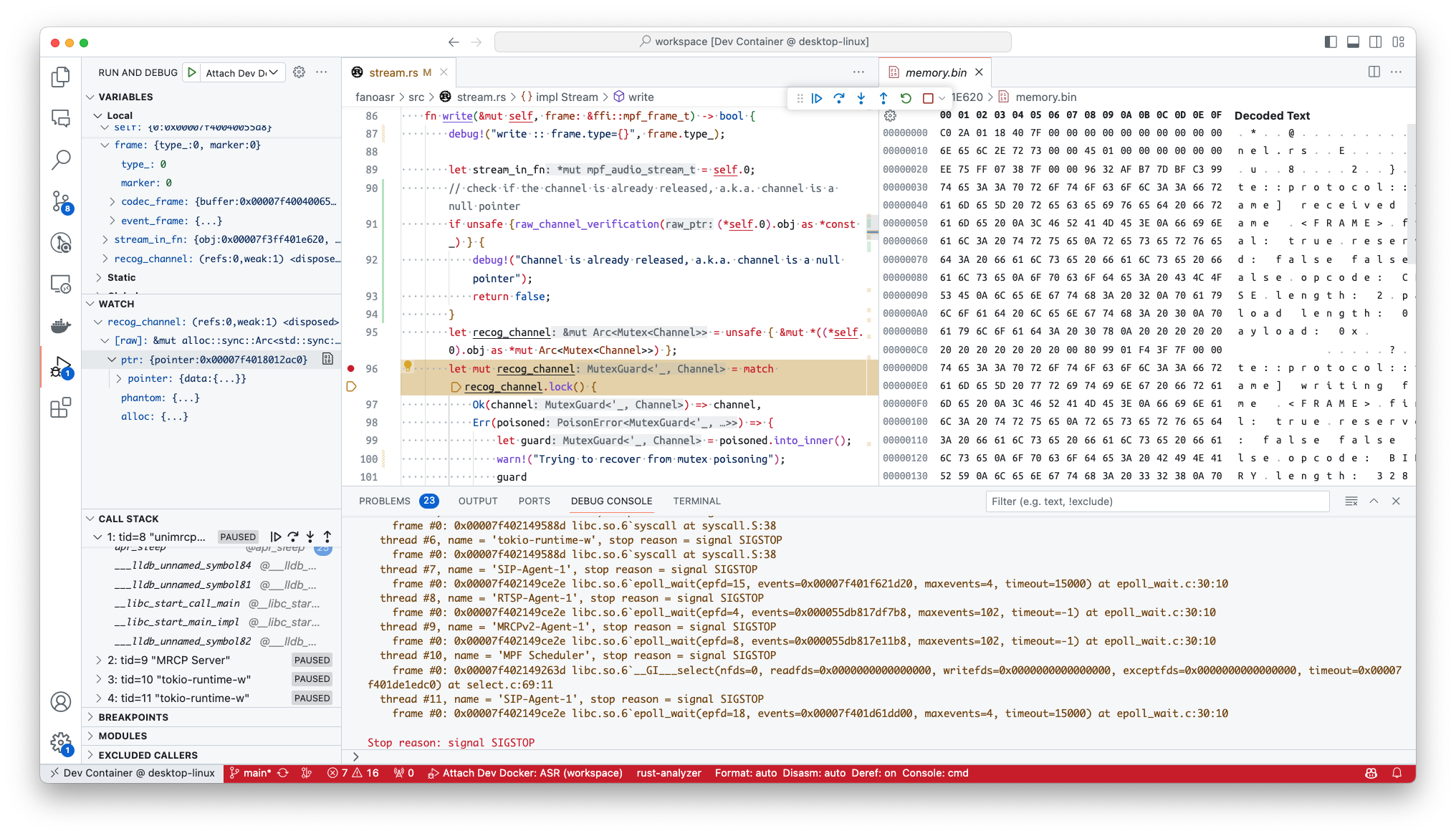
    <content type="html"><![CDATA[<h2 id="TL-DR">TL;DR</h2><p>This article will cover how to debug a remote Rust library by attaching it to the main remote process in the remote.</p><h2 id="But-Why">But Why?</h2><p>I tried to write a plugin using Rust for UniMRCP for my work. Because I encountered some Segmentation Fault that I suspected to be related to the issue in memory access, I found that just including the good old <code>print</code> was not sufficient to debug the issue underneath, so I decided to use a debugger to help me out.</p><p>However, I later found out that my case is really specific and not easy to set up debugging:</p><ul><li>The development environment is on a remote server;</li><li>the UniMRCP/Freeswitch stack is deployed with Docker Compose;</li><li>The server is behind a firewall that I am not sure what it is using (well, later I found out it was <code>firewall-cmd</code>).</li></ul><p>I have spent some time setting it up at last, so I decided to share this so that people won’t go through the pain like I do.</p><h2 id="Setup-the-Server">Setup the Server</h2><p>On the server side, as the main binary is located inside the Docker image, I need to update the <code>Dockerfile</code> to install the LLDB Server. Please make sure the package name used in your operating system, You will also have to write a custom script as an entrypoint so that the LLDB Server can be properly started with the main applications:</p><figure class="highlight sh"><table><tr><td class="gutter"><pre><span class="line">1</span><br><span class="line">2</span><br><span class="line">3</span><br><span class="line">4</span><br></pre></td><td class="code"><pre><span class="line"><span class="meta">#!/bin/bash</span></span><br><span class="line">...</span><br><span class="line">lldb-server platform --listen <span class="string">&#x27;*:&#x27;</span><span class="variable">$LLDB_SERVER_PORT</span> --server --gdbserver-port <span class="variable">$GDB_SERVER_PORT</span></span><br><span class="line">./unimrcpserver</span><br></pre></td></tr></table></figure><p>Then I added the environment variables in the <code>docker-compose.yml</code> file:</p><figure class="highlight plaintext"><table><tr><td class="gutter"><pre><span class="line">1</span><br><span class="line">2</span><br><span class="line">3</span><br><span class="line">4</span><br><span class="line">5</span><br><span class="line">6</span><br><span class="line">7</span><br></pre></td><td class="code"><pre><span class="line">...</span><br><span class="line">  unimrcp:</span><br><span class="line">     ...</span><br><span class="line">     environment:</span><br><span class="line">     - LLDB_SERVER_PORT=10586</span><br><span class="line">     - GDB_SERVER_PORT=9980</span><br><span class="line"></span><br></pre></td></tr></table></figure><p>Due to the nature of UniMRCP, I have already set the docker to host mode. If you are not using host mode, you are also required to mount the port out of the Docker with <code>ports</code> with your configured port.</p><h2 id="setup-VSCode">setup VSCode</h2><p>on VS Code, you will need to do some initial setup first. You will need an LLDB Debugger extension installed from the marketplace and also install <code>lldb</code> on the system. after that, you will need to create a <code>launch.json</code> file in the <code>.vscode</code> folder:</p><figure class="highlight json"><table><tr><td class="gutter"><pre><span class="line">1</span><br><span class="line">2</span><br><span class="line">3</span><br><span class="line">4</span><br><span class="line">5</span><br><span class="line">6</span><br><span class="line">7</span><br><span class="line">8</span><br><span class="line">9</span><br><span class="line">10</span><br><span class="line">11</span><br><span class="line">12</span><br><span class="line">13</span><br><span class="line">14</span><br><span class="line">15</span><br><span class="line">16</span><br><span class="line">17</span><br><span class="line">18</span><br><span class="line">19</span><br><span class="line">20</span><br><span class="line">21</span><br><span class="line">22</span><br><span class="line">23</span><br><span class="line">24</span><br><span class="line">25</span><br><span class="line">26</span><br></pre></td><td class="code"><pre><span class="line"><span class="punctuation">&#123;</span></span><br><span class="line">    <span class="comment">// Use IntelliSense to learn about possible attributes.</span></span><br><span class="line">    <span class="comment">// Hover to view descriptions of existing attributes.</span></span><br><span class="line">    <span class="comment">// For more information, visit: https://go.microsoft.com/fwlink/?linkid=830387</span></span><br><span class="line">    <span class="attr">&quot;version&quot;</span><span class="punctuation">:</span> <span class="string">&quot;0.2.0&quot;</span><span class="punctuation">,</span></span><br><span class="line">    <span class="attr">&quot;configurations&quot;</span><span class="punctuation">:</span> <span class="punctuation">[</span></span><br><span class="line">        <span class="punctuation">&#123;</span></span><br><span class="line">            <span class="attr">&quot;name&quot;</span><span class="punctuation">:</span> <span class="string">&quot;Remote launch&quot;</span><span class="punctuation">,</span></span><br><span class="line">            <span class="attr">&quot;type&quot;</span><span class="punctuation">:</span> <span class="string">&quot;lldb&quot;</span><span class="punctuation">,</span></span><br><span class="line">            <span class="attr">&quot;request&quot;</span><span class="punctuation">:</span> <span class="string">&quot;custom&quot;</span><span class="punctuation">,</span></span><br><span class="line">            <span class="attr">&quot;targetCreateCommands&quot;</span><span class="punctuation">:</span> <span class="punctuation">[</span></span><br><span class="line">                <span class="string">&quot;target create $&#123;workspaceFolder&#125;/target/debug/&lt;lib&gt;.so&quot;</span></span><br><span class="line">            <span class="punctuation">]</span><span class="punctuation">,</span></span><br><span class="line">            <span class="attr">&quot;processCreateCommands&quot;</span><span class="punctuation">:</span> <span class="punctuation">[</span></span><br><span class="line">                <span class="string">&quot;attach -p 7&quot;</span></span><br><span class="line">            <span class="punctuation">]</span><span class="punctuation">,</span></span><br><span class="line">            <span class="attr">&quot;initCommands&quot;</span><span class="punctuation">:</span> <span class="punctuation">[</span></span><br><span class="line">                <span class="string">&quot;platform select remote-linux&quot;</span><span class="punctuation">,</span> <span class="comment">// For example: &#x27;remote-linux&#x27;, &#x27;remote-macosx&#x27;, &#x27;remote-android&#x27;, etc.</span></span><br><span class="line">                <span class="string">&quot;platform connect connect://&lt;remote-server&gt;:10586&quot;</span><span class="punctuation">,</span></span><br><span class="line">            <span class="punctuation">]</span><span class="punctuation">,</span></span><br><span class="line">            <span class="attr">&quot;sourceMap&quot;</span><span class="punctuation">:</span> <span class="punctuation">&#123;</span></span><br><span class="line">                <span class="attr">&quot;&lt;path/to/lib/in/docker/image&gt;.so&quot;</span><span class="punctuation">:</span> <span class="string">&quot;$&#123;workspaceFolder&#125;/target/debug/&lt;lib&gt;.so&quot;</span></span><br><span class="line">        <span class="punctuation">&#125;</span></span><br><span class="line">    <span class="punctuation">&#125;</span></span><br><span class="line">    <span class="punctuation">]</span></span><br><span class="line"><span class="punctuation">&#125;</span></span><br></pre></td></tr></table></figure><p>Notice that there is <code>attach -p 7</code> in the <code>processCreateCommands</code>. This is because the main process is running in the Docker container, and the process ID is usually 7. You might want to use the program name instead by using <code>attach -n &lt;program name&gt;</code>.</p><p>After that, you can start the debugger by selecting the <code>Remote launch</code> configuration in the debug panel; It should connect to the remote server and automatically attach to the process.</p><p><figure class="image-caption"><img src="https://cdn.patrickwu.space/assets/posts/setup-remote-docker-lldb/1.png" alt="How it works"><figcaption>How it works</figcaption></figure></p>]]></content>


    <summary type="html">&lt;h2 id=&quot;TL-DR&quot;&gt;TL;DR&lt;/h2&gt;
&lt;p&gt;This article will cover how to debug a remote Rust library by attaching it to the main remote process in the re</summary>


    <category term="Docker" scheme="https://patrickwu.space/tags/Docker/"/>
    
    <category term="Rust" scheme="https://patrickwu.space/tags/Rust/"/>
    
    <category term="lldb" scheme="https://patrickwu.space/tags/lldb/"/>
    
  </entry>
  
  <entry>
    <title>Install Lemmy, Simplified(?)</title>
    <link href="https://patrickwu.space/2023/11/04/install-lemmy-simplified/"/>
    <id>https://patrickwu.space/2023/11/04/install-lemmy-simplified/</id>
    <published>2023-11-04T07:42:36.000Z</published>
    <updated>2026-02-07T05:53:40.000Z</updated>
    
    <content type="html"><![CDATA[<h2 id="It’s-been-a-while…">It’s been a while…</h2><p>I have to admit, I haven’t posted much this year. As I just posted a simple solution for problems I encountered during my development in Go (see <a href="https://pkwl.ink/cwl1r">this</a>), and I feel this is not enough.</p><p>I decided to document my process of setting up my own Lemmy instance <a href="https://community.o0o.social">o0o Community</a> (Still setting up the rules and stuff for the instance) using Docker, since I have a lot of issues with the official documentation.</p><p>I feel like this guide will simplify things a bit for you to stop you from jumping around different places of documentation, but, well, it is still not that simple to set up Lemmy. Hope you find this shitty guide useful.</p><h2 id="First-things-first">First things first</h2><p>The very first thing of self-hosting Lemmy is following <a href="https://join-lemmy.org/docs/administration/install_docker.html">the official documentation</a>. To save you time from jumping around, I will include the part here:</p><ol><li>Make sure <code>docker</code> and <code>docker compose</code> 2.0 is installed;</li><li>and make a folder specifically for Lemmy files;</li><li>Download files to the folder:</li></ol>  <figure class="highlight plaintext"><table><tr><td class="gutter"><pre><span class="line">1</span><br><span class="line">2</span><br></pre></td><td class="code"><pre><span class="line">wget https://raw.githubusercontent.com/LemmyNet/lemmy-ansible/main/templates/nginx_internal.conf</span><br><span class="line">wget https://raw.githubusercontent.com/LemmyNet/lemmy-ansible/main/files/proxy_params</span><br></pre></td></tr></table></figure><p>We are not downloading the <code>docker-compose.yml</code> and <code>lemmy.hjson</code> from the repository; I will show you how to set up them in the next part.</p><p>For <code>customPostgresql.conf</code>, I would suggest you directly generate the file from <a href="https://pgtune.leopard.in.ua/">https://pgtune.leopard.in.ua/</a> and include the following at the end:</p><figure class="highlight ini"><table><tr><td class="gutter"><pre><span class="line">1</span><br><span class="line">2</span><br><span class="line">3</span><br><span class="line">4</span><br><span class="line">5</span><br></pre></td><td class="code"><pre><span class="line"><span class="comment"># Other custom params</span></span><br><span class="line"><span class="attr">synchronous_commit</span>=<span class="literal">off</span></span><br><span class="line"></span><br><span class="line"><span class="comment"># Listen beyond localhost</span></span><br><span class="line"><span class="attr">listen_addresses</span> = <span class="string">&#x27;*&#x27;</span></span><br></pre></td></tr></table></figure><p>Make sure the <code>listen_addresses</code> line is included, otherwise, you won’t be able to start the server, and it will complain you cannot connect to Postgresql.</p><p>And we are completed for now. We will go back to the official documentation later, because for <code>docker-compose.yml</code> and <code>lemmy.hjson</code>, I modified and simplified for you.</p><h2 id="lemmy-hjson"><code>lemmy.hjson</code></h2><p>For this file, the official documentation did not properly provide neither the proper documentation nor the default file for the configuration; The actual full config definition is located at <a href="https://github.com/LemmyNet/lemmy/blob/main/config/defaults.hjson">https://github.com/LemmyNet/lemmy/blob/main/config/defaults.hjson</a>.</p><p>However, since there are a lot of fields not needed for a simple setup (of course, if you want a more complete setup, you can totally just follow the default file in the above link):</p><figure class="highlight plaintext"><table><tr><td class="gutter"><pre><span class="line">1</span><br><span class="line">2</span><br><span class="line">3</span><br><span class="line">4</span><br><span class="line">5</span><br><span class="line">6</span><br><span class="line">7</span><br><span class="line">8</span><br><span class="line">9</span><br><span class="line">10</span><br><span class="line">11</span><br><span class="line">12</span><br><span class="line">13</span><br><span class="line">14</span><br><span class="line">15</span><br><span class="line">16</span><br><span class="line">17</span><br><span class="line">18</span><br><span class="line">19</span><br><span class="line">20</span><br><span class="line">21</span><br><span class="line">22</span><br><span class="line">23</span><br><span class="line">24</span><br><span class="line">25</span><br><span class="line">26</span><br><span class="line">27</span><br><span class="line">28</span><br><span class="line">29</span><br><span class="line">30</span><br><span class="line">31</span><br><span class="line">32</span><br><span class="line">33</span><br><span class="line">34</span><br><span class="line">35</span><br><span class="line">36</span><br><span class="line">37</span><br><span class="line">38</span><br><span class="line">39</span><br><span class="line">40</span><br><span class="line">41</span><br><span class="line">42</span><br><span class="line">43</span><br><span class="line">44</span><br><span class="line">45</span><br><span class="line">46</span><br><span class="line">47</span><br><span class="line">48</span><br><span class="line">49</span><br><span class="line">50</span><br><span class="line">51</span><br><span class="line">52</span><br><span class="line">53</span><br></pre></td><td class="code"><pre><span class="line">&#123;</span><br><span class="line">  # Settings related to the Postgresql database</span><br><span class="line">  database: &#123;</span><br><span class="line">    # Username to connect to postgres</span><br><span class="line">    user: &quot;string&quot;</span><br><span class="line">    # Password to connect to postgres</span><br><span class="line">    password: &quot;string&quot;</span><br><span class="line">    # Host where postgres is running</span><br><span class="line">    host: &quot;string&quot;</span><br><span class="line">    # Port where postgres can be accessed</span><br><span class="line">    port: 5432</span><br><span class="line">    # Name of the postgres database for lemmy</span><br><span class="line">    database: &quot;string&quot;</span><br><span class="line">    # Maximum number of active sql connections</span><br><span class="line">    pool_size: 95</span><br><span class="line">  &#125;</span><br><span class="line">  # Settings related to activitypub federation</span><br><span class="line">  # Pictrs image server configuration.</span><br><span class="line">  pictrs: &#123;</span><br><span class="line">    # Address where pictrs is available (for image hosting)</span><br><span class="line">    url: &quot;http://localhost:8080/&quot;</span><br><span class="line">    # Set a custom pictrs API key. ( Required for deleting images )</span><br><span class="line">    api_key: &quot;string&quot;</span><br><span class="line">    # Cache remote images</span><br><span class="line">    cache_remote_images: true</span><br><span class="line">  &#125;</span><br><span class="line">  # Email sending configuration. All options except login/password are mandatory</span><br><span class="line">  email: &#123;</span><br><span class="line">    # Hostname and port of the smtp server</span><br><span class="line">    smtp_server: &quot;localhost:25&quot;</span><br><span class="line">    # Login name for smtp server</span><br><span class="line">    smtp_login: &quot;string&quot;</span><br><span class="line">    # Password to login to the smtp server</span><br><span class="line">    smtp_password: &quot;string&quot;</span><br><span class="line">    # Address to send emails from, eg &quot;noreply@your-instance.com&quot;</span><br><span class="line">    smtp_from_address: &quot;noreply@example.com&quot;</span><br><span class="line">    # Whether or not smtp connections should use tls. Can be none, tls, or starttls</span><br><span class="line">    tls_type: &quot;none&quot;</span><br><span class="line">  &#125;</span><br><span class="line">  # Parameters for automatic configuration of new instance (only used at first start)</span><br><span class="line">  setup: &#123;</span><br><span class="line">    # Username for the admin user</span><br><span class="line">    admin_username: &quot;admin&quot;</span><br><span class="line">    # Password for the admin user. It must be between 10 and 60 characters.</span><br><span class="line">    admin_password: &quot;&quot;</span><br><span class="line">    # Name of the site, can be changed later. Maximum 20 characters.</span><br><span class="line">    site_name: &quot;My Lemmy Instance&quot;</span><br><span class="line">    # Email for the admin user (optional, can be omitted and set later through the website)</span><br><span class="line">    admin_email: &quot;user@example.com&quot;</span><br><span class="line">  &#125;</span><br><span class="line">  # the domain name of your instance (mandatory)</span><br><span class="line">  hostname: &quot;&lt;YOUR_DOMAIN&gt;&quot;</span><br><span class="line">&#125;</span><br></pre></td></tr></table></figure><p>Also, we will need postgresql database info and pictrs API key later in the next step when we change the <code>docker-compose.yml</code> just to keep in mind.</p><h2 id="docker-compose-yml"><code>docker-compose.yml</code></h2><p>For this section, the downloaded file is a template file designed for Ansible; which we need to have a lot of editing to make the work. So to save time, here is a completed version for you:</p><figure class="highlight yml"><table><tr><td class="gutter"><pre><span class="line">1</span><br><span class="line">2</span><br><span class="line">3</span><br><span class="line">4</span><br><span class="line">5</span><br><span class="line">6</span><br><span class="line">7</span><br><span class="line">8</span><br><span class="line">9</span><br><span class="line">10</span><br><span class="line">11</span><br><span class="line">12</span><br><span class="line">13</span><br><span class="line">14</span><br><span class="line">15</span><br><span class="line">16</span><br><span class="line">17</span><br><span class="line">18</span><br><span class="line">19</span><br><span class="line">20</span><br><span class="line">21</span><br><span class="line">22</span><br><span class="line">23</span><br><span class="line">24</span><br><span class="line">25</span><br><span class="line">26</span><br><span class="line">27</span><br><span class="line">28</span><br><span class="line">29</span><br><span class="line">30</span><br><span class="line">31</span><br><span class="line">32</span><br><span class="line">33</span><br><span class="line">34</span><br><span class="line">35</span><br><span class="line">36</span><br><span class="line">37</span><br><span class="line">38</span><br><span class="line">39</span><br><span class="line">40</span><br><span class="line">41</span><br><span class="line">42</span><br><span class="line">43</span><br><span class="line">44</span><br><span class="line">45</span><br><span class="line">46</span><br><span class="line">47</span><br><span class="line">48</span><br><span class="line">49</span><br><span class="line">50</span><br><span class="line">51</span><br><span class="line">52</span><br><span class="line">53</span><br><span class="line">54</span><br><span class="line">55</span><br><span class="line">56</span><br><span class="line">57</span><br><span class="line">58</span><br><span class="line">59</span><br><span class="line">60</span><br><span class="line">61</span><br><span class="line">62</span><br><span class="line">63</span><br><span class="line">64</span><br><span class="line">65</span><br><span class="line">66</span><br><span class="line">67</span><br><span class="line">68</span><br><span class="line">69</span><br><span class="line">70</span><br><span class="line">71</span><br><span class="line">72</span><br><span class="line">73</span><br><span class="line">74</span><br><span class="line">75</span><br><span class="line">76</span><br><span class="line">77</span><br><span class="line">78</span><br><span class="line">79</span><br><span class="line">80</span><br><span class="line">81</span><br><span class="line">82</span><br><span class="line">83</span><br><span class="line">84</span><br><span class="line">85</span><br><span class="line">86</span><br><span class="line">87</span><br><span class="line">88</span><br><span class="line">89</span><br><span class="line">90</span><br><span class="line">91</span><br><span class="line">92</span><br><span class="line">93</span><br><span class="line">94</span><br><span class="line">95</span><br><span class="line">96</span><br><span class="line">97</span><br><span class="line">98</span><br><span class="line">99</span><br><span class="line">100</span><br><span class="line">101</span><br><span class="line">102</span><br><span class="line">103</span><br><span class="line">104</span><br><span class="line">105</span><br><span class="line">106</span><br><span class="line">107</span><br><span class="line">108</span><br><span class="line">109</span><br><span class="line">110</span><br><span class="line">111</span><br><span class="line">112</span><br><span class="line">113</span><br><span class="line">114</span><br><span class="line">115</span><br></pre></td><td class="code"><pre><span class="line"><span class="attr">version:</span> <span class="string">&quot;3.7&quot;</span></span><br><span class="line"></span><br><span class="line"><span class="attr">x-logging:</span> <span class="string">&amp;default-logging</span></span><br><span class="line">  <span class="attr">driver:</span> <span class="string">&quot;json-file&quot;</span></span><br><span class="line">  <span class="attr">options:</span></span><br><span class="line">    <span class="attr">max-size:</span> <span class="string">&quot;50m&quot;</span></span><br><span class="line">    <span class="attr">max-file:</span> <span class="string">&quot;4&quot;</span></span><br><span class="line"></span><br><span class="line"><span class="attr">services:</span></span><br><span class="line">  <span class="attr">proxy:</span></span><br><span class="line">    <span class="attr">container_name:</span> <span class="string">proxy</span></span><br><span class="line">    <span class="attr">image:</span> <span class="string">docker.io/library/nginx</span></span><br><span class="line">    <span class="attr">ports:</span></span><br><span class="line">      <span class="comment"># actual and only port facing any connection from outside</span></span><br><span class="line">      <span class="comment"># Note, change the left number if port 1236 is already in use on your system</span></span><br><span class="line">      <span class="comment"># You could use port 80 if you won&#x27;t use a reverse proxy</span></span><br><span class="line">      <span class="bullet">-</span> <span class="string">&quot;8536:8536&quot;</span></span><br><span class="line">    <span class="attr">volumes:</span></span><br><span class="line">      <span class="bullet">-</span> <span class="string">./nginx_internal.conf:/etc/nginx/nginx.conf:ro,Z</span></span><br><span class="line">      <span class="bullet">-</span> <span class="string">./proxy_params:/etc/nginx/proxy_params:ro,Z</span></span><br><span class="line">    <span class="attr">restart:</span> <span class="string">always</span></span><br><span class="line">    <span class="attr">logging:</span> <span class="string">*default-logging</span></span><br><span class="line">    <span class="attr">depends_on:</span></span><br><span class="line">      <span class="bullet">-</span> <span class="string">pictrs</span></span><br><span class="line">      <span class="bullet">-</span> <span class="string">lemmy-ui</span></span><br><span class="line">  <span class="attr">lemmy-ui:</span></span><br><span class="line">    <span class="attr">container_name:</span> <span class="string">lemmy-ui</span></span><br><span class="line">    <span class="attr">image:</span> <span class="string">dessalines/lemmy-ui:$&#123;LEMMY_VERSION&#125;</span></span><br><span class="line">    <span class="attr">environment:</span></span><br><span class="line">      <span class="bullet">-</span> <span class="string">LEMMY_UI_LEMMY_INTERNAL_HOST=lemmy:8536</span></span><br><span class="line">      <span class="bullet">-</span> <span class="string">LEMMY_UI_LEMMY_EXTERNAL_HOST=$&#123;DOMAIN&#125;</span></span><br><span class="line">      <span class="bullet">-</span> <span class="string">LEMMY_UI_HTTPS=true</span></span><br><span class="line">    <span class="attr">volumes:</span></span><br><span class="line">      <span class="bullet">-</span> <span class="string">./volumes/lemmy-ui/extra_themes:/app/extra_themes</span></span><br><span class="line">    <span class="attr">depends_on:</span></span><br><span class="line">      <span class="bullet">-</span> <span class="string">lemmy</span></span><br><span class="line">    <span class="attr">restart:</span> <span class="string">always</span></span><br><span class="line">    <span class="attr">logging:</span> <span class="string">*default-logging</span></span><br><span class="line">  <span class="attr">lemmy:</span></span><br><span class="line">    <span class="attr">container_name:</span> <span class="string">lemmy</span></span><br><span class="line">    <span class="attr">image:</span> <span class="string">dessalines/lemmy:$&#123;LEMMY_VERSION&#125;</span></span><br><span class="line">    <span class="attr">hostname:</span> <span class="string">lemmy</span></span><br><span class="line">    <span class="attr">restart:</span> <span class="string">always</span></span><br><span class="line">    <span class="attr">logging:</span> <span class="string">*default-logging</span></span><br><span class="line">    <span class="attr">environment:</span></span><br><span class="line">      <span class="bullet">-</span> <span class="string">RUST_LOG=warn</span></span><br><span class="line">    <span class="attr">volumes:</span></span><br><span class="line">      <span class="bullet">-</span> <span class="string">./lemmy.hjson:/config/config.hjson:Z</span></span><br><span class="line">    <span class="attr">depends_on:</span></span><br><span class="line">      <span class="bullet">-</span> <span class="string">postgres</span></span><br><span class="line">      <span class="bullet">-</span> <span class="string">pictrs</span></span><br><span class="line">  <span class="attr">pictrs:</span></span><br><span class="line">    <span class="attr">container_name:</span> <span class="string">pictrs</span></span><br><span class="line">    <span class="attr">image:</span> <span class="string">docker.io/c:0.4.3</span></span><br><span class="line">    <span class="comment"># This needs to match the pictrs url in lemmy.hjson</span></span><br><span class="line">    <span class="attr">hostname:</span> <span class="string">pictrs</span></span><br><span class="line">    <span class="attr">environment:</span></span><br><span class="line">      <span class="bullet">-</span> <span class="string">PICTRS__MEDIA__EXTERNAL_VALIDATION=http://pictrs-safety:14051/api/v1/scan/IPADDR</span></span><br><span class="line">      <span class="bullet">-</span> <span class="string">PICTRS__MEDIA__VIDEO_CODEC=vp9</span></span><br><span class="line">      <span class="bullet">-</span> <span class="string">PICTRS__MEDIA__GIF__MAX_WIDTH=256</span></span><br><span class="line">      <span class="bullet">-</span> <span class="string">PICTRS__MEDIA__GIF__MAX_HEIGHT=256</span></span><br><span class="line">      <span class="bullet">-</span> <span class="string">PICTRS__MEDIA__GIF__MAX_AREA=65536</span></span><br><span class="line">      <span class="bullet">-</span> <span class="string">PICTRS__MEDIA__GIF__MAX_FRAME_COUNT=400</span></span><br><span class="line">      <span class="bullet">-</span> <span class="string">PICTRS_OPENTELEMETRY_URL=http://otel:4137</span></span><br><span class="line">      <span class="bullet">-</span> <span class="string">RUST_LOG=debug</span></span><br><span class="line">      <span class="bullet">-</span> <span class="string">RUST_BACKTRACE=full</span></span><br><span class="line">      <span class="bullet">-</span> <span class="string">PICTRS__API_KEY=$&#123;PICTRS_API_KEY&#125;</span></span><br><span class="line">      <span class="bullet">-</span> <span class="string">PICTRS__STORE__TYPE=$&#123;PICTRS_STORE_TYPE&#125;</span></span><br><span class="line">      <span class="bullet">-</span> <span class="string">PICTRS__STORE__ENDPOINT=$&#123;PICTRS_STORE_ENDPOINT&#125;</span></span><br><span class="line">      <span class="bullet">-</span> <span class="string">PICTRS__STORE__BUCKET_NAME=$&#123;PICTRS_STORE_BUCKET_NAME&#125;</span></span><br><span class="line">      <span class="bullet">-</span> <span class="string">PICTRS__STORE__REGION=$&#123;PICTRS_STORE_REGION&#125;</span></span><br><span class="line">      <span class="bullet">-</span> <span class="string">PICTRS__STORE__USE_PATH_STYLE=$&#123;PICTRS_STORE_USE_PATH_STYLE&#125;</span></span><br><span class="line">      <span class="bullet">-</span> <span class="string">PICTRS__STORE__ACCESS_KEY=$&#123;PICTRS_STORE_ACCESS_KEY&#125;</span></span><br><span class="line">      <span class="bullet">-</span> <span class="string">PICTRS__STORE__SECRET_KEY=$&#123;PICTRS_STORE_SECRET_KEY&#125;</span></span><br><span class="line">    <span class="attr">volumes:</span></span><br><span class="line">      <span class="bullet">-</span> <span class="string">./volumes/pictrs:/mnt:Z</span></span><br><span class="line">    <span class="attr">user:</span> <span class="number">991</span><span class="string">:991</span></span><br><span class="line">    <span class="attr">restart:</span> <span class="string">always</span></span><br><span class="line">    <span class="attr">logging:</span> <span class="string">*default-logging</span></span><br><span class="line">    <span class="attr">deploy:</span></span><br><span class="line">      <span class="attr">resources:</span></span><br><span class="line">        <span class="attr">limits:</span></span><br><span class="line">          <span class="attr">memory:</span> <span class="string">690m</span></span><br><span class="line">  <span class="attr">postgres:</span></span><br><span class="line">    <span class="attr">container_name:</span> <span class="string">postgres</span></span><br><span class="line">    <span class="attr">image:</span> <span class="string">docker.io/postgres:15-alpine</span></span><br><span class="line">    <span class="attr">hostname:</span> <span class="string">postgres</span></span><br><span class="line">    <span class="attr">environment:</span></span><br><span class="line">      <span class="bullet">-</span> <span class="string">POSTGRES_USER=$&#123;POSTGRES_USER&#125;</span></span><br><span class="line">      <span class="bullet">-</span> <span class="string">POSTGRES_PASSWORD=$&#123;POSTGRES_PASSWORD&#125;</span></span><br><span class="line">      <span class="bullet">-</span> <span class="string">POSTGRES_DB=$&#123;POSTGRES_DB&#125;</span></span><br><span class="line">    <span class="attr">volumes:</span></span><br><span class="line">      <span class="bullet">-</span> <span class="string">./volumes/postgres:/var/lib/postgresql/data:Z</span></span><br><span class="line">      <span class="bullet">-</span> <span class="string">./customPostgresql.conf:/etc/postgresql.conf</span></span><br><span class="line">    <span class="attr">restart:</span> <span class="string">always</span></span><br><span class="line">    <span class="attr">command:</span> <span class="string">postgres</span> <span class="string">-c</span> <span class="string">config_file=/etc/postgresql.conf</span></span><br><span class="line">    <span class="attr">logging:</span> <span class="string">*default-logging</span></span><br><span class="line">  <span class="attr">pictrs-safety:</span></span><br><span class="line">    <span class="attr">image:</span> <span class="string">ghcr.io/db0/pictrs-safety:v1.2.2</span></span><br><span class="line">    <span class="attr">hostname:</span> <span class="string">pictrs-safety</span></span><br><span class="line">    <span class="attr">container_name:</span> <span class="string">pictrs-safety</span></span><br><span class="line">    <span class="attr">environment:</span></span><br><span class="line">    <span class="bullet">-</span> <span class="string">FEDIVERSE_SAFETY_WORKER_AUTH=&quot;$&#123;PICTRS_SAFETY_WORKER_AUTH&#125;&quot;</span></span><br><span class="line">    <span class="bullet">-</span> <span class="string">FEDIVERSE_SAFETY_IMGDIR=&quot;/tmp/images&quot;</span></span><br><span class="line">    <span class="bullet">-</span> <span class="string">USE_SQLITE=1</span></span><br><span class="line">    <span class="bullet">-</span> <span class="string">secret_key=&quot;$&#123;PICTRS_SECRET_KEY&#125;&quot;</span></span><br><span class="line">    <span class="bullet">-</span> <span class="string">SCAN_BYPASS_THRESHOLD=10</span></span><br><span class="line">    <span class="bullet">-</span> <span class="string">MISSING_WORKER_THRESHOLD=5</span></span><br><span class="line">    <span class="attr">ports:</span></span><br><span class="line">      <span class="bullet">-</span> <span class="string">&quot;14051:14051&quot;</span></span><br><span class="line">    <span class="attr">user:</span> <span class="number">991</span><span class="string">:991</span></span><br><span class="line">    <span class="attr">restart:</span> <span class="string">always</span></span><br><span class="line">    <span class="attr">logging:</span> <span class="string">*default-logging</span></span><br><span class="line">    <span class="attr">depends_on:</span></span><br><span class="line">      <span class="bullet">-</span> <span class="string">pictrs</span></span><br></pre></td></tr></table></figure><p>Then, you just need to fill the following environment variables in a <code>.env</code> file and you are done:</p><figure class="highlight yml"><table><tr><td class="gutter"><pre><span class="line">1</span><br><span class="line">2</span><br><span class="line">3</span><br><span class="line">4</span><br><span class="line">5</span><br><span class="line">6</span><br><span class="line">7</span><br><span class="line">8</span><br><span class="line">9</span><br><span class="line">10</span><br><span class="line">11</span><br><span class="line">12</span><br><span class="line">13</span><br><span class="line">14</span><br><span class="line">15</span><br><span class="line">16</span><br><span class="line">17</span><br><span class="line">18</span><br><span class="line">19</span><br><span class="line">20</span><br><span class="line">21</span><br></pre></td><td class="code"><pre><span class="line"><span class="string">LEMMY_VERSION=0.18.5</span></span><br><span class="line"><span class="string">DOMAIN=</span></span><br><span class="line"><span class="comment"># postgres</span></span><br><span class="line"><span class="string">POSTGRES_USER=</span></span><br><span class="line"><span class="string">POSTGRES_PASSWORD=</span></span><br><span class="line"><span class="string">POSTGRES_DB=</span></span><br><span class="line"><span class="comment"># pictrs</span></span><br><span class="line"><span class="comment">## keys</span></span><br><span class="line"><span class="string">PICTRS_API_KEY=</span></span><br><span class="line"><span class="comment">### 15 random characters</span></span><br><span class="line"><span class="string">PICTRS_SAFETY_WORKER_AUTH=</span></span><br><span class="line"><span class="comment">### 80 random characters</span></span><br><span class="line"><span class="string">PICTRS_SECRET_KEY=</span></span><br><span class="line"><span class="comment">## storage type; by default is filesystem for object storage please set it to object_storage</span></span><br><span class="line"><span class="string">PICTRS_STORE_TYPE=filesystem</span></span><br><span class="line"><span class="string">PICTRS_STORE_ENDPOINT=</span></span><br><span class="line"><span class="string">PICTRS_STORE_BUCKET_NAME=</span></span><br><span class="line"><span class="string">PICTRS_STORE_REGION=</span></span><br><span class="line"><span class="string">PICTRS_STORE_USE_PATH_STYLE=false</span></span><br><span class="line"><span class="string">PICTRS_STORE_ACCESS_KEY=</span></span><br><span class="line"><span class="string">PICTRS_STORE_SECRET_KEY=</span></span><br></pre></td></tr></table></figure><p>Most of them are very self-explanatory but I will need to talk about <code>pictrs</code> a bit; if you want to do further customizations, the full <code>pictrs</code> documentation is located here: <a href="https://git.asonix.dog/asonix/pict-rs/src/branch/main/pict-rs.toml">https://git.asonix.dog/asonix/pict-rs/src/branch/main/pict-rs.toml</a>, somehow is not easy to find via search engines.</p><h1>Annnnd start!</h1><p>afterward, the core files should now be properly prepared. We should now go back to the official documentation with the step <a href="https://join-lemmy.org/docs/administration/install_docker.html#folder-permissions">Folder permissions</a> to start the server; Again, I will post the step directly here:</p><blockquote><p>Set the correct permissions for pictrs folder:</p><figure class="highlight plaintext"><table><tr><td class="gutter"><pre><span class="line">1</span><br><span class="line">2</span><br></pre></td><td class="code"><pre><span class="line">mkdir -p volumes/pictrs</span><br><span class="line">sudo chown -R 991:991 volumes/pictrs</span><br></pre></td></tr></table></figure></blockquote><p>And finally, <code>docker compose up -d</code> to start the server.</p><p>You can also optionally follow the step <a href="https://join-lemmy.org/docs/administration/install_docker.html#reverse-proxy--webserver">Reverse Proxy / Webserver</a> and<br><a href="https://join-lemmy.org/docs/administration/install_docker.html#lets-encrypt">Let’s Encrypt</a> if you need. And afterwards, you will get a working Lemmy server using Docker.</p><p>Hopefully, you find this useful.</p>]]></content>


    <summary type="html">&lt;h2 id=&quot;It’s-been-a-while…&quot;&gt;It’s been a while…&lt;/h2&gt;
&lt;p&gt;I have to admit, I haven’t posted much this year. As I just posted a simple solution </summary>


    <category term="Self-host" scheme="https://patrickwu.space/tags/Self-host/"/>
    
    <category term="Lemmy" scheme="https://patrickwu.space/tags/Lemmy/"/>
    
    <category term="Docker" scheme="https://patrickwu.space/tags/Docker/"/>
    
  </entry>
  
  <entry>
    <title>Doing add and subtract directly in Go templates</title>
    <link href="https://patrickwu.space/2023/10/29/doing-add-and-subtract-directly-in-Go-templates/"/>
    <id>https://patrickwu.space/2023/10/29/doing-add-and-subtract-directly-in-Go-templates/</id>
    <published>2023-10-29T16:19:28.000Z</published>
    <updated>2026-02-07T05:53:40.000Z</updated>
    
    <content type="html"><![CDATA[<h2 id="Well-You-Know">Well, You Know</h2><p>You know, this year happened way too much that I just realized I haven’t posted for a really long time. My last post is in Feburary, so O haven’t posted in over half a year! So I decided to post something today on solving some stupid things I encountered and figured out during my work: Pure arithmetic operations in Go templates.</p><h2 id="Calculations-needed-but-no-access">Calculations needed, but no access</h2><p>During the work, I got something that I needed to craft a Go template to generate a report using a utility, but at the mean time I needed to perform some simple calculations during the process, so I went to check the <a href="https://pkg.go.dev/text/template#hdr-Functions">official documentation</a>, I realized there are no arithmetic operations in native Go Template. Normally, If you want to do something like this, what you will need to do is the following:</p><figure class="highlight golang"><table><tr><td class="gutter"><pre><span class="line">1</span><br><span class="line">2</span><br><span class="line">3</span><br><span class="line">4</span><br><span class="line">5</span><br><span class="line">6</span><br><span class="line">7</span><br><span class="line">8</span><br><span class="line">9</span><br><span class="line">10</span><br><span class="line">11</span><br><span class="line">12</span><br><span class="line">13</span><br><span class="line">14</span><br></pre></td><td class="code"><pre><span class="line">funcMap := template.FuncMap&#123;</span><br><span class="line">    <span class="string">&quot;add&quot;</span>: <span class="function"><span class="keyword">func</span><span class="params">(i <span class="type">int</span>)</span></span> <span class="type">int</span> &#123;</span><br><span class="line">        <span class="keyword">return</span> i + <span class="number">1</span></span><br><span class="line">    &#125;,</span><br><span class="line">&#125;</span><br><span class="line"></span><br><span class="line">tmpl, err := template.New(<span class="string">&quot;test&quot;</span>).Funcs(funcMap).Parse(<span class="string">`&#123;&#123;add 1&#125;&#125;`</span>)</span><br><span class="line"><span class="keyword">if</span> err != <span class="literal">nil</span> &#123;</span><br><span class="line">    <span class="built_in">panic</span>(err)</span><br><span class="line">&#125;</span><br><span class="line">err = tmpl.Execute(os.Stdout, <span class="literal">nil</span>)</span><br><span class="line"><span class="keyword">if</span> err != <span class="literal">nil</span> &#123;</span><br><span class="line">    <span class="built_in">panic</span>(err)</span><br><span class="line">&#125;</span><br></pre></td></tr></table></figure><p>In this case, the output would be 2.</p><h2 id="addition-and-subtraction…-with-1">addition and subtraction… with 1</h2><p>So, what should I do to do that <em>natively</em> with Go template? After a quick search, I found this <a href="https://stackoverflow.com/a/72465098">Stack Overflow solution</a>; this solution enables adds and subtractions by one with limitations for a non-negative solutions:</p><ul><li>For addition, using <code>&#123;&#123; len (printf "a%*s" $number "") &#125;&#125;</code> to add by 1;</li><li>For subtractionion, using <code>&#123;&#123; len (slice (printf "%*s" $number "") 1) &#125;&#125;</code> to subtraction by 1.</li></ul><p>And this is how they works:</p><ul><li>For addition, this works by constructing a string with <code>$number</code> of character <code>&quot;&quot;</code> and add a single character <code>a</code> and then calculate the length;</li><li>similarly, for subtraction, this works by constructing a string with <code>$number</code> of character <code>&quot;&quot;</code> and slicing the string with one letter, and then calculating the length.</li></ul><h2 id="add-and-subtraction">add and subtraction!</h2><p>After I knew how it worked, I decided to modify it so that I could add or subtract any number with it, like the following:</p><ul><li>For addition: <code>&#123;&#123; len (printf "%*s%*s" $numbera "" $numberb "") &#125;&#125;</code></li><li>For subtraction: <code>&#123;&#123; len (slice (printf "%*s" $numbera "") $numberb) &#125;&#125;</code></li></ul><p>In this way, I can finally generate my report normally. A sample can be seen <a href="https://go.dev/play/p/aSo_ZheJ7Lf">here</a>.</p>]]></content>


    <summary type="html">&lt;h2 id=&quot;Well-You-Know&quot;&gt;Well, You Know&lt;/h2&gt;
&lt;p&gt;You know, this year happened way too much that I just realized I haven’t posted for a really l</summary>


    <category term="GoLang" scheme="https://patrickwu.space/tags/GoLang/"/>
    
  </entry>
  
  <entry>
    <title>The Jellyfish stings: Note to upgrading servers from Ubuntu 20.04 to 22.04</title>
    <link href="https://patrickwu.space/2023/02/09/ubuntu-server-2004-2204-upgrade-note/"/>
    <id>https://patrickwu.space/2023/02/09/ubuntu-server-2004-2204-upgrade-note/</id>
    <published>2023-02-09T16:03:46.000Z</published>
    <updated>2026-02-07T05:53:40.000Z</updated>
    
    <content type="html"><![CDATA[<h2 id="TL-DR">TL;DR</h2><p>After upgrading my main server from Ubuntu 20.04 to 22.04, I had to fix a few things related to PHP, Apache2, Docker and VirtualEnv. Here are some notes to myself for the next time I need to do these.</p><h2 id="The-Jellyfish-stings-my-fossa">The Jellyfish stings my fossa</h2><p>I recently decided to upgrade my server from Ubuntu 20.04 to 22.04, after seeing the notification asking me to upgrade the server for months. I thought it will be smooth as upgrading my laptop (wait, what am I saying, Ubuntu upgrade broke my firefox and that’s why I switch my desktop to Fedora), but it turns out it was a painful process. After investigating each service, I finally got everything working again. Here are some notes to myself for the next time I need to do these.</p><h2 id="PHP-unfriended-apache2">PHP unfriended apache2</h2><p>I have a few PHP projects running on my server, and I use apache2 as the web server. One thing I upgrade my machine is to, of course, use the latest PHP 8.1 to replace the unsupported PHP 7.4. But after upgrading, the apache2 service failed to start, complaining about a file not being found in a configuration file.</p><p>After some investigation, I found out that apparently, apache2 won’t automatically disable the old PHP module. I had to manually disable the old PHP module and enable the new one:</p><figure class="highlight bash"><table><tr><td class="gutter"><pre><span class="line">1</span><br><span class="line">2</span><br></pre></td><td class="code"><pre><span class="line">a2dismod php7.4</span><br><span class="line">a2enmod php8.1</span><br></pre></td></tr></table></figure><p>After that, I restarted the apache2 service, but it still failed to start. I checked the apache2 error log and found out that it was complaining about connecting to the PHP-FPM socket: <code>AH02454: FCGI: attempt to connect to Unix domain socket /run/php/php7.4-fpm.sock (*) failed</code>.</p><p>After some more investigation, I realized that it was the same issue as the previous one: it’s not using the new PHP-FPM service. I had to remove the old PHP-FPM service and install the new one:</p><figure class="highlight bash"><table><tr><td class="gutter"><pre><span class="line">1</span><br><span class="line">2</span><br></pre></td><td class="code"><pre><span class="line"><span class="built_in">sudo</span> apt remove php7.4-fpm</span><br><span class="line"><span class="built_in">sudo</span> apt install php8.1-fpm</span><br></pre></td></tr></table></figure><p>After that, reenable several modules and configurations and restart apache2:</p><figure class="highlight bash"><table><tr><td class="gutter"><pre><span class="line">1</span><br><span class="line">2</span><br></pre></td><td class="code"><pre><span class="line"><span class="built_in">sudo</span> a2enmod proxy_fcgi setenvif</span><br><span class="line"><span class="built_in">sudo</span> a2enconf php8.1-fpm</span><br></pre></td></tr></table></figure><p>then restart apache2, and it should be working again.</p><h2 id="Docker-containers-sinking-to-the-bottom-of-the-ocean">Docker containers sinking to the bottom of the ocean</h2><p>I have a few docker containers running on my server, some of them are running using one-line Docker command, and some of them are running using <code>docker compose</code>. After upgrading, I found that several services are not running.</p><p>After some investigation, I realised that these docker containers are not running automatically after the server is rebooted since I didn’t use the <code>--restart=always</code> flag.</p><p>Afterward, I checked all my one-line docker commands and added the <code>--restart=always</code> flag to them. For the <code>docker compose</code>, Also make sure I added the <code>restart: always</code> flag in the <code>docker-compose.yml</code> file.</p><h2 id="Where-is-ma-Python">Where is ma Python?</h2><p>I have a few python projects running on my server, and I use <code>virtualenv</code> to manage the python environment. After upgrading, I found out that all the services related to Python failed to start. After some investigation, I found out that Python got upgraded to 3.9, and the <code>virtualenv</code> I created was using Python 3.8. I had to recreate all of the <code>virtualenv</code> using Python 3.9 to make the work again.</p>]]></content>


    <summary type="html">&lt;h2 id=&quot;TL-DR&quot;&gt;TL;DR&lt;/h2&gt;
&lt;p&gt;After upgrading my main server from Ubuntu 20.04 to 22.04, I had to fix a few things related to PHP, Apache2, D</summary>


    <category term="Web" scheme="https://patrickwu.space/tags/Web/"/>
    
    <category term="Docker" scheme="https://patrickwu.space/tags/Docker/"/>
    
    <category term="PHP" scheme="https://patrickwu.space/tags/PHP/"/>
    
    <category term="VirtualEnv" scheme="https://patrickwu.space/tags/VirtualEnv/"/>
    
    <category term="apache2" scheme="https://patrickwu.space/tags/apache2/"/>
    
  </entry>
  
  <entry>
    <title>Solving GSConnect on Fedora unable to find phone</title>
    <link href="https://patrickwu.space/2023/01/07/fedora-gsconnet-unable-to-find-phone/"/>
    <id>https://patrickwu.space/2023/01/07/fedora-gsconnet-unable-to-find-phone/</id>
    <published>2023-01-07T17:25:28.000Z</published>
    <updated>2026-02-07T05:53:40.000Z</updated>
    
    <content type="html"><![CDATA[<h2 id="TL-DR">TL;DR</h2><p>This is a quick post on how to solve the issue of GSConnect on Fedora being unable to find mobile phones; The solution already exists for a while but it is hidden way too deep in the issues so I decided to write a quick post on how to solve it to help others.</p><h2 id="The-short-tale">The short tale</h2><p>As you might know, I switched from Ubuntu to Fedora a few months ago due to Firefox snap broke my workflow. Recently, I wanted to use GSConnect to connect to my iPhone. I installed the extension and the KDE Connect app on my phone, but both devices cannot find each other; I tried multiple methods, including refreshing the list on both devices, and debugging the network like opening ports on the Linux side and removing additional Proxy service on my iPhone. Unfortunately, all of them do not help. After digging into the issues in GSconnect for a while, I found this issue that is unrelated to my issue(there is no error in <code>journalctl</code>): <a href="https://github.com/GSConnect/gnome-shell-extension-gsconnect/issues/735">https://github.com/GSConnect/gnome-shell-extension-gsconnect/issues/735</a></p><p>There is one comment at the very bottom of the issue. it contains just one command:</p><figure class="highlight bash"><table><tr><td class="gutter"><pre><span class="line">1</span><br></pre></td><td class="code"><pre><span class="line">systemctl reload --user dbus-broker.service</span><br></pre></td></tr></table></figure><p>After running this command, GSConnect finally works and I can see my phone in GSConnect:</p><p><figure class="image-caption"><img src="https://cdn.patrickwu.space/posts/IMG_6053.PNG" alt="GSConnect"><figcaption>GSConnect</figcaption></figure></p>]]></content>


    <summary type="html">&lt;h2 id=&quot;TL-DR&quot;&gt;TL;DR&lt;/h2&gt;
&lt;p&gt;This is a quick post on how to solve the issue of GSConnect on Fedora being unable to find mobile phones; The s</summary>


    <category term="Linux" scheme="https://patrickwu.space/tags/Linux/"/>
    
    <category term="Fedora" scheme="https://patrickwu.space/tags/Fedora/"/>
    
    <category term="GSConnect" scheme="https://patrickwu.space/tags/GSConnect/"/>
    
  </entry>
  
  <entry>
    <title>formidable, koa-body and my rant about CVE</title>
    <link href="https://patrickwu.space/2022/08/19/formidable-koa-body-and-my-rant-about-cve/"/>
    <id>https://patrickwu.space/2022/08/19/formidable-koa-body-and-my-rant-about-cve/</id>
    <published>2022-08-19T01:39:27.000Z</published>
    <updated>2026-02-07T05:53:40.000Z</updated>
    
    <content type="html"><![CDATA[<h2 id="TL-DR">TL; DR</h2><p>This is a recent thing that happened to me around a vulnerability that caused incompatibility in the project in my current company, and my thought (rant) on CVEs.</p><h2 id="CVE-2022-29622">CVE-2022-29622</h2><p><a href="https://cve.mitre.org/cgi-bin/cvename.cgi?name=CVE-2022-29622">CVE-2022-29622</a>. This is one of the vulnerabilities reported by the customer after rounds of sending fixed versions. After my initial investigation, this is a vulnerability that affects a nodeJS package called <code>formidable</code>. A quick <code>yarn why</code> revealed that this is used by <code>koa-body</code>, a package that our project directly used. It is quickly revealed that <code>formidable</code> had patched the issue in version  <code>3.2.4</code>. Then it’s easy, just a simple <code>resolution</code> right? Oh boy, I was wrong…</p><h2 id="ERR-REQUIRE-ESM">ERR_REQUIRE_ESM</h2><p>I was enjoying my weekend when the Server team pinged me and told me the images I delivered cannot be started on Kubernetes and they are tossing errors:</p><figure class="highlight plaintext"><table><tr><td class="gutter"><pre><span class="line">1</span><br><span class="line">2</span><br></pre></td><td class="code"><pre><span class="line">Error [ERR_REQUIRE_ESM]: Must use import to load ES Module: ./node_modules/formidable/src/index.js</span><br><span class="line">require() of ES modules is not supported.</span><br></pre></td></tr></table></figure><p>Well well well. It’s an ES Module. We now got a problem. According to the <a href="https://github.com/node-formidable/formidable/blob/master/VERSION_NOTES.md">website</a>, <code>formidable@v3</code> is an ES Module without CommonJS support.</p><p>Now we have a very interesting situation:<br><code>formidable@v3</code> is an ES Module, but it fixed the vulnerability;<br><code>koa-body</code> is written in CommonJS with TypeScript support; it is not able to use ES Module only packages;<br>Our project is written in CommonJS.</p><p>Oh no.</p><p><code>koa-body</code> themselves can <a href="https://github.com/koajs/koa-body/issues/200">only upgrade to <code>formidable@v2</code> at most</a>. So, this leaves two options for us:</p><ol><li>Rewrite <code>formidable</code> to backport the fix;</li><li>Drop <code>koa-body</code>.</li></ol><p>We end up choosing the latter and delivered the fix.</p><p>But I still wrote a fix for option 1 (Although actually not needed, see my rant for more details). If you still have to use <code>formidable</code>, you can use a fixed version that patched the problem in <code>@v2</code> with a fake 3.2.4 version to bypass the vulnerability: <a href="https://github.com/patrick330602/formidable">https://github.com/patrick330602/formidable</a>.</p><h2 id="The-Rant">The Rant</h2><h3 id="Vulnerability">Vulnerability</h3><p>Ahh, vulnerability.</p><p>You know, Debian Security Tracker got <a href="https://security-team.debian.org/security_tracker.html#issues-not-for-us-nfu"><code>NOT_FOR_US</code></a>, Ubuntu Security Tracker got <a href="https://twitter.com/callmepkwu/status/1547484325297659904?s=21&amp;t=4owCSw55sgiNKxU10AV_8g">504</a>, and People got COVID-19.</p><p>Software is built by man, people make mistakes, and that means no software is perfect. Softwares are always potentially vulnerable. Heck, even we the human are not vulnerable to the latest vulnerability, COVID-19!</p><p>But there will be people who say no, for example, large cooperation running critical infrastructures. They have strict vulnerability requirements and will toss you a report of 30k vulnerabilities, and tell you to fix it. Yep, that’s me. I took a week to generate 500+ suggestions for all dev teams just for that.</p><p>However, this is exactly what I am ranting for. These kinds of unfixable, problematic, or questionable bugs or vulnerabilities are driving me nuts.</p><h3 id="False-Positive">False Positive</h3><p>From the NVD database, I saw a link to <a href="https://medium.com/@zsolt.imre/is-cybersecurity-the-next-supply-chain-vulnerability-9a00de745022">a Medium article talking about this CVE (And their rants)</a>. This is a really good article talking about the issue, and why this is a false positive vulnerability.</p><p>Problematic vulnerabilities are still really common. They <a href="https://security.snyk.io/vuln/SNYK-JS-FORMIDABLE-2838956">can be revoked</a> from a third party, but it seems not for CVE themselves. heck, there are even <a href="https://github.com/anchore/grype/issues/446">falsely linked vulnerabilities</a>. However, your (and our) customers usually won’t listen. They will point out <strong>it is</strong> a vulnerability and needs to be fixed. What we could only do is tell them they are not able to be fixed now.</p><p>The original <a href="https://github.com/node-formidable/formidable/issues/856">CVE-2022-29622 issue</a> has some interesting discussions too. This line by <code>@keymandll</code>perfectly sums up the problem in CVEs:</p><blockquote><p>The CVE looks to me like yet another overly eager “security professional” trying to get a CVE attached to his/her name by ignoring context and understanding of responsibilities. Then, all the other lemmings just accept it and pick it up without actually looking into the reported “issue”.</p></blockquote><p>The funny thing about that Medium article is that it says, and I quote:</p><blockquote><p>Even the National Vulnerability Database (NVD) is willing to accept anything nowadays?</p></blockquote><p>Well, guess where I find the article? The CVE site!</p><p>Oh the irony.</p>]]></content>


    <summary type="html">&lt;h2 id=&quot;TL-DR&quot;&gt;TL; DR&lt;/h2&gt;
&lt;p&gt;This is a recent thing that happened to me around a vulnerability that caused incompatibility in the project i</summary>


    <category term="DevOps" scheme="https://patrickwu.space/tags/DevOps/"/>
    
    <category term="Container" scheme="https://patrickwu.space/tags/Container/"/>
    
    <category term="Security" scheme="https://patrickwu.space/tags/Security/"/>
    
    <category term="CVE" scheme="https://patrickwu.space/tags/CVE/"/>
    
    <category term="Vulnerability" scheme="https://patrickwu.space/tags/Vulnerability/"/>
    
    <category term="NodeJS" scheme="https://patrickwu.space/tags/NodeJS/"/>
    
    <category term="TypeScript" scheme="https://patrickwu.space/tags/TypeScript/"/>
    
  </entry>
  
  <entry>
    <title>Shrinking and Securing that Container</title>
    <link href="https://patrickwu.space/2022/08/14/shrinking-securing-containers/"/>
    <id>https://patrickwu.space/2022/08/14/shrinking-securing-containers/</id>
    <published>2022-08-14T06:29:50.000Z</published>
    <updated>2026-02-07T05:53:40.000Z</updated>
    
    <content type="html"><![CDATA[<h2 id="TL-DR">TL; DR</h2><p>This article will talk about several tools I am recently using to better secure the existing and in-development projects that use Kubernetes.</p><h2 id="it-all-starts-with-scanning…">it all starts with scanning…</h2><p>As you might know, I recently joined a new company and switched my main focus to security management and improvement (Also some software development). Since different client uses different scanning tools (Like Plasma Cloud or Synk) for feedback, to save time, I started to find tools to help me get things done easily.</p><h2 id="Finding-individual-vulnerabilities-grype-syft">Finding individual vulnerabilities: <code>grype</code>/<code>syft</code></h2><p><code>grype</code> is an awesome tool to analyze vulnerabilities. It supports a wide range of operating systems and programming languages, but the most important part would be it supports not only the local projects, but also supports Docker/Podman images, SBOM files, and OCI archives. This allows me to scan images without using <code>docker scan</code> which requires you to log in to the DockerHub account.</p><p>Since <code>grype</code> is based on <code>syft</code>, this also allowed me to easily check the dependencies’ location. For example, I got reports from the Dev team that they cannot find where the vulnerability of a JavaScript dependency <code>jquery-ui</code> comes from. Using <code>grype</code>/<code>syft</code>, I was able to know that the package is located in the python package <code>matplotlib</code>.</p><p><code>syft</code> Also could help check dependencies for me, such that I would be able to discover the dependencies that are not intended to be installed to reduce the possibility of getting vulnerability.</p><p>You can get them here:</p><ul><li><code>grype</code>: <a href="https://github.com/anchore/grype">https://github.com/anchore/grype</a></li><li><code>syft</code>: <a href="https://github.com/anchore/syft">https://github.com/anchore/syft</a></li></ul><h2 id="Check-how-the-image-is-generated-dive">Check how the image is generated: <code>dive</code></h2><p>Because all of the projects in the company are delivered in containers, sometimes it got confusing about which package is installed on which step (at which layer) during the build of the images. I used <code>dive</code> to help me with this part. <code>dive</code> allows you to peek through the images’ layers, and check which files and folders are being added, deleted, and modified.</p><p>Using this, I can provide a more minimal installation of containers; I have used this to reduce the layers for the duplicating file-adding-and-deleting process. With fewer dependencies, it also provides less possibility of getting unnecessary vulnerabilities.</p><p>You can get it here: <a href="https://github.com/wagoodman/dive">https://github.com/wagoodman/dive</a></p><h2 id="Fix-the-vulnerability-from-the-source-Snyk-for-VSCode">Fix the vulnerability from the source: Snyk for VSCode</h2><p>Sometimes, besides the container images and Dockerfiles, I have to modify the projects to update the images. I then discovered this extension on VSCode called <strong>Snyk for VSCode</strong>. This extension can scan the potentially vulnerable codes from your code, as well as scan the dependencies file and mark the vulnerable dependencies out, for example, <code>package.json</code> and <code>yarn.lock</code>.</p><p>You can download the extension here:<br><a href="https://marketplace.visualstudio.com/items?itemName=snyk-security.snyk-vulnerability-scanner">https://marketplace.visualstudio.com/items?itemName=snyk-security.snyk-vulnerability-scanner</a></p><h2 id="Final-words">Final words</h2><p>These are just what I use for solving my own problem. There are many more solutions on the internet that are possibly better than them. I just hope these tools will also help you with certain tasks.</p>]]></content>


    <summary type="html">&lt;h2 id=&quot;TL-DR&quot;&gt;TL; DR&lt;/h2&gt;
&lt;p&gt;This article will talk about several tools I am recently using to better secure the existing and in-developmen</summary>


    <category term="DevOps" scheme="https://patrickwu.space/tags/DevOps/"/>
    
    <category term="Container" scheme="https://patrickwu.space/tags/Container/"/>
    
    <category term="Security" scheme="https://patrickwu.space/tags/Security/"/>
    
    <category term="Kubernetes" scheme="https://patrickwu.space/tags/Kubernetes/"/>
    
  </entry>
  
  <entry>
    <title>Switching Images when Changing System Theme</title>
    <link href="https://patrickwu.space/2022/04/26/html-images-dark-mode/"/>
    <id>https://patrickwu.space/2022/04/26/html-images-dark-mode/</id>
    <published>2022-04-26T06:25:19.000Z</published>
    <updated>2026-02-07T05:53:40.000Z</updated>
    
    <content type="html"><![CDATA[<p>Following system color scheme in HTML easily achieved since the availability of <code>prefers-color-scheme</code> in CSS. This website also uses it to automatically switch themes. But right now I need to switch images according to the color scheme.</p><p>A quick search online reveals that most solutions are using JavaScript to achieve the goal, which would be not ideal. This is because:</p><ol><li>My major goal is to reduce the usage of JavaScript on this site, so user can still visit the website without losing experience;</li><li>Some places requires no JapaScripts, thus unable to implement.</li></ol><p>After some more digging, I discovered <a href="https://webkit.org/blog/8840/dark-mode-support-in-webkit/">this article on WebKit blog</a>. As mentioned in this article, we can use <code>&lt;picture&gt;</code> to achieve the goal:</p><figure class="highlight html"><table><tr><td class="gutter"><pre><span class="line">1</span><br><span class="line">2</span><br><span class="line">3</span><br><span class="line">4</span><br></pre></td><td class="code"><pre><span class="line"><span class="tag">&lt;<span class="name">picture</span>&gt;</span></span><br><span class="line">    <span class="tag">&lt;<span class="name">source</span> <span class="attr">srcset</span>=<span class="string">&quot;dark.jpg&quot;</span> <span class="attr">media</span>=<span class="string">&quot;(prefers-color-scheme: dark)&quot;</span>&gt;</span></span><br><span class="line">    <span class="tag">&lt;<span class="name">img</span> <span class="attr">src</span>=<span class="string">&quot;light.jpg&quot;</span>&gt;</span></span><br><span class="line"><span class="tag">&lt;/<span class="name">picture</span>&gt;</span></span><br></pre></td></tr></table></figure><p>Just simply replace <code>light.jpg</code> and <code>dark.jpg</code> to the desired image path and it works like a charm.</p><p>One thing I am worried about is whether it supports other browsers like chromium-based ones. After testing in Microsoft Edge and Brave, the code do work on both chromium-based browsers.</p>]]></content>


    <summary type="html">&lt;p&gt;Following system color scheme in HTML easily achieved since the availability of &lt;code&gt;prefers-color-scheme&lt;/code&gt; in CSS. This website al</summary>


    <category term="HTML" scheme="https://patrickwu.space/tags/HTML/"/>
    
  </entry>
  
  <entry>
    <title>Build a static comic blog using Hexo</title>
    <link href="https://patrickwu.space/2022/04/03/hexo-build-simple-comic-blog/"/>
    <id>https://patrickwu.space/2022/04/03/hexo-build-simple-comic-blog/</id>
    <published>2022-04-03T14:45:17.000Z</published>
    <updated>2026-02-07T05:53:40.000Z</updated>
    
    <content type="html"><![CDATA[<h2 id="TL-DR">TL;DR</h2><p>This is an article about building a simple static comic blog that behaves like <a href="https://xkcd.com">xkcd</a> with <code>ejs</code> as template engine and vanilla JavaScriptt.</p><h2 id="Self-hosted-and-static">Self-hosted and static</h2><p>I have been wanting to build my own comic blog for… (checks my last comic) a year now. One thing I always trying to achieve is to make it simple and static, and self-hosted.</p><p>The first thing I thought is to use ComicPress on WordPress that being used by a lot of people including the famous <a href="xkcd.com">xkcd</a>. After I tried to setup WordPress I realised the ComicPress no longer exist on the plugin store for the newer version, and the existing ones like Comic Easel is not what I expected, since they all tried to load comic on a subpage like <code>domain/comic/</code>.</p><p>This leads me to go back to Hexo. Unfortunately, there is <strong>no</strong> information about building comic website on Hexo. Only one I found is a theme called <a href="https://github.com/rudism/hexo-theme-funnies">funnies</a> and it is broken in the latest version of Hexo. This leads me to the idea of building my own comic site using Hexo.</p><h2 id="To-the-latest-comic">To the latest comic!</h2><p>Firstly, I tried to redirect the index page(<code>index.ejs</code>) to the latest comic:</p><figure class="highlight plaintext"><figcaption><span>index.ejs</span></figcaption><table><tr><td class="gutter"><pre><span class="line">1</span><br></pre></td><td class="code"><pre><span class="line">&lt;meta http-equiv=&#x27;refresh&#x27; content=&quot;0;URL=&#x27;&lt;%- url_for(site.posts.sort(&#x27;date&#x27;).toArray().slice(-1)[0].path) %&gt;&#x27;&quot; /&gt;</span><br></pre></td></tr></table></figure><p>This will redirect index page to the latest comic page, a.k.a. <code>&lt;%- url_for(site.posts.sort('date').toArray().slice(-1)[0].path) %&gt;</code>.</p><p>This one-liner is pretty simple: get all posts, sort by date, convert to Array, get the last item, and then get the <code>path</code> property and pass to the Hexo built-in function <code>url_for()</code> to get the URL.</p><p>Also, you should also consider the people who block auto-redirect by include a link to the latest comic too:</p><figure class="highlight plaintext"><figcaption><span>index.ejs</span></figcaption><table><tr><td class="gutter"><pre><span class="line">1</span><br></pre></td><td class="code"><pre><span class="line">&lt;b&gt;If auto-redirect is not working, click &lt;a href=&quot;&lt;%- url_for(site.posts.sort(&#x27;date&#x27;).toArray().slice(-1)[0].path) %&gt;&quot;&gt;here&lt;/a&gt;.&lt;/b&gt;</span><br></pre></td></tr></table></figure><h2 id="The-navigation">The navigation</h2><p>The navigation I am referring to is the thing like this:</p><p><figure class="image-caption"><img src="https://cdn.patrickwu.space/posts/dev/hexo-comic/1.png" alt="The comic navigation bar in xkcd.com"><figcaption>The comic navigation bar in xkcd.com</figcaption></figure></p><p>Yes, that one in the red rectangle: <em>First</em>(<code>|&lt;</code>), <em>Prev</em>, <em>Random</em>, <em>Next</em> and <em>Last</em>(<code>&gt;|</code>).</p><p>For the <em>First</em>, <em>Prev</em>, <em>Next</em> and <em>Last</em>(<code>&gt;|</code>), the code will look like the following:</p><figure class="highlight plaintext"><figcaption><span>navigation.ejs</span></figcaption><table><tr><td class="gutter"><pre><span class="line">1</span><br><span class="line">2</span><br><span class="line">3</span><br><span class="line">4</span><br><span class="line">5</span><br><span class="line">6</span><br><span class="line">7</span><br><span class="line">8</span><br><span class="line">9</span><br><span class="line">10</span><br><span class="line">11</span><br><span class="line">12</span><br><span class="line">13</span><br><span class="line">14</span><br><span class="line">15</span><br><span class="line">16</span><br><span class="line">17</span><br><span class="line">18</span><br></pre></td><td class="code"><pre><span class="line">&lt;nav&gt;</span><br><span class="line">  &lt;% var sorted = site.posts.sort(&#x27;date&#x27;).toArray() %&gt;</span><br><span class="line">  &lt;% if (page.next)&#123; %&gt;</span><br><span class="line">    &lt;a class=&quot;post-nav-title&quot; href=&quot;&lt;%- url_for(sorted[0].path) %&gt;&quot;&gt;First&lt;/a&gt;&amp;nbsp;&amp;nbsp;</span><br><span class="line">    &lt;a class=&quot;post-nav-title&quot; href=&quot;&lt;%- url_for(page.next.path) %&gt;&quot;&gt;Prev&lt;/a&gt;&amp;nbsp;&amp;nbsp;</span><br><span class="line">  &lt;% &#125; else &#123; %&gt;</span><br><span class="line">    First&amp;nbsp;&amp;nbsp;</span><br><span class="line">    Prev&amp;nbsp;&amp;nbsp;</span><br><span class="line">  &lt;% &#125; %&gt;</span><br><span class="line">&lt;a class=&quot;post-nav-title&quot; id=&quot;random&quot; href=&quot;#&quot;&gt;Random&lt;/a&gt;&amp;nbsp;&amp;nbsp;</span><br><span class="line">  &lt;% if (page.prev)&#123; %&gt;</span><br><span class="line">    &lt;a class=&quot;post-nav-title&quot; href=&quot;&lt;%- url_for(page.prev.path) %&gt;&quot;&gt;Next&lt;/a&gt;&amp;nbsp;&amp;nbsp;</span><br><span class="line">    &lt;a class=&quot;post-nav-title&quot; href=&quot;&lt;%- url_for(sorted.slice(-1)[0].path) %&gt;&quot;&gt;Last&lt;/a&gt;</span><br><span class="line">  &lt;% &#125; else &#123; %&gt;</span><br><span class="line">    Next&amp;nbsp;&amp;nbsp;</span><br><span class="line">    Last</span><br><span class="line">  &lt;% &#125; %&gt;</span><br><span class="line">&lt;/nav&gt;</span><br></pre></td></tr></table></figure><p>Let’s not talk about that <em>Random</em> link for now. As you can see, it is really similar to the redirection code, since they are just like the standard pagination.</p><p>You possibly noticed that the text for <code>page.next</code> and <code>page.prev</code> are actually <strong>Prev</strong> and <strong>Next</strong>. This is because the default sorting used in <code>page.next</code> and <code>page.prev</code> is from oldest to newest (a.k.a. The order of <code>site.posts.sort('date')</code>), and that is why it is named like this.</p><h2 id="Random-the-mix-of-JS-and-EJS">Random: the mix of JS and EJS</h2><p><em>Random</em> is possibly the most interesting part of code, since it is a mix of JavaScript and EJS.</p><figure class="highlight plaintext"><figcaption><span>header.ejs</span></figcaption><table><tr><td class="gutter"><pre><span class="line">1</span><br><span class="line">2</span><br><span class="line">3</span><br><span class="line">4</span><br><span class="line">5</span><br><span class="line">6</span><br><span class="line">7</span><br><span class="line">8</span><br><span class="line">9</span><br><span class="line">10</span><br><span class="line">11</span><br><span class="line">12</span><br><span class="line">13</span><br><span class="line">14</span><br><span class="line">15</span><br><span class="line">16</span><br><span class="line">17</span><br><span class="line">18</span><br><span class="line">19</span><br><span class="line">20</span><br><span class="line">21</span><br><span class="line">22</span><br><span class="line">23</span><br><span class="line">24</span><br><span class="line">25</span><br><span class="line">26</span><br><span class="line">27</span><br></pre></td><td class="code"><pre><span class="line">...</span><br><span class="line"></span><br><span class="line">&lt;script type=&quot;text/javascript&quot;&gt;</span><br><span class="line">  //&lt;![CDATA[</span><br><span class="line">    &lt;% var tmp_list = &quot;&quot;;</span><br><span class="line">    site.posts.toArray().forEach((i, ind, array)=&gt;&#123;</span><br><span class="line">      if (i.path !== page.path) &#123;</span><br><span class="line">        tmp_list = tmp_list + &#x27;&quot;&#x27;+url_for(i.path)+&#x27;&quot;&#x27;;</span><br><span class="line">        if (ind &lt; array.length-1) tmp_list = tmp_list + &#x27;,&#x27;;</span><br><span class="line">      &#125;</span><br><span class="line">    &#125;) %&gt;</span><br><span class="line">  </span><br><span class="line">  (function() &#123;</span><br><span class="line">      window.onload = function() &#123;</span><br><span class="line">        var a = document.getElementById(&quot;random&quot;);</span><br><span class="line">        a.onclick = function() &#123;</span><br><span class="line">          var posts = [&lt;%- tmp_list %&gt;];</span><br><span class="line">          var random = Math.floor(Math.random() * posts.length);</span><br><span class="line">          window.location.href = posts[random];</span><br><span class="line">          return;</span><br><span class="line">        &#125;</span><br><span class="line">      &#125;</span><br><span class="line">  &#125;());</span><br><span class="line">  //]]&gt;</span><br><span class="line">  &lt;/script&gt;</span><br><span class="line"></span><br><span class="line">...</span><br></pre></td></tr></table></figure><p>As you can see, it consists of two part: Line 3 - 11 is the ejs part, and the rest is JavaScript part. The ejs part will generate a string  named <code>tmp_list</code> that looks like a JavaScript list content for the paths of all comic, and then we pass the output to the JavaScript part of the <code>posts</code> variable, and we will perform the normal randomize process using JavaScript.</p><h2 id="comic-tag-in-posts-and-RSS"><code>comic</code> tag in posts; and RSS</h2><p>This part is rather simple: add following code in your <code>post.ejs</code>:</p><figure class="highlight plaintext"><figcaption><span>post.ejs</span></figcaption><table><tr><td class="gutter"><pre><span class="line">1</span><br><span class="line">2</span><br><span class="line">3</span><br><span class="line">4</span><br><span class="line">5</span><br><span class="line">6</span><br><span class="line">7</span><br></pre></td><td class="code"><pre><span class="line">...</span><br><span class="line"></span><br><span class="line">&lt;% if (page.comic) &#123; %&gt;</span><br><span class="line">&lt;img src=&quot;&lt;%= page.comic %&gt;&quot; alt=&quot;&lt;%= page.title %&gt;&quot; /&gt;</span><br><span class="line">&lt;% &#125; %&gt;</span><br><span class="line"></span><br><span class="line">...</span><br></pre></td></tr></table></figure><p>However, if you generate RSS feed, this would be problematic since there will be no comic in your RSS xml.</p><p>So firstly, add following content to your custom RSS template:</p><figure class="highlight xml"><figcaption><span>rss.xml</span></figcaption><table><tr><td class="gutter"><pre><span class="line">1</span><br><span class="line">2</span><br><span class="line">3</span><br><span class="line">4</span><br><span class="line">5</span><br><span class="line">6</span><br><span class="line">7</span><br><span class="line">8</span><br><span class="line">9</span><br><span class="line">10</span><br><span class="line">11</span><br><span class="line">12</span><br><span class="line">13</span><br><span class="line">14</span><br><span class="line">15</span><br><span class="line">16</span><br><span class="line">17</span><br><span class="line">18</span><br><span class="line">19</span><br><span class="line">20</span><br><span class="line">21</span><br><span class="line">22</span><br><span class="line">23</span><br><span class="line">24</span><br><span class="line">25</span><br><span class="line">26</span><br><span class="line">27</span><br><span class="line">28</span><br><span class="line">29</span><br><span class="line">30</span><br><span class="line">31</span><br><span class="line">32</span><br><span class="line">33</span><br><span class="line">34</span><br><span class="line">35</span><br><span class="line">36</span><br></pre></td><td class="code"><pre><span class="line"><span class="meta">&lt;?xml version=<span class="string">&quot;1.0&quot;</span> encoding=<span class="string">&quot;utf-8&quot;</span>?&gt;</span></span><br><span class="line"><span class="tag">&lt;<span class="name">rss</span> <span class="attr">version</span>=<span class="string">&quot;2.0&quot;</span></span></span><br><span class="line"><span class="tag">  <span class="attr">xmlns:atom</span>=<span class="string">&quot;http://www.w3.org/2005/Atom&quot;</span></span></span><br><span class="line"><span class="tag">  <span class="attr">xmlns:content</span>=<span class="string">&quot;http://purl.org/rss/1.0/modules/content/&quot;</span>&gt;</span></span><br><span class="line">  <span class="tag">&lt;<span class="name">channel</span>&gt;</span></span><br><span class="line">    <span class="tag">&lt;<span class="name">title</span>&gt;</span>&#123;&#123; config.title &#125;&#125;<span class="tag">&lt;/<span class="name">title</span>&gt;</span></span><br><span class="line">    <span class="tag">&lt;<span class="name">link</span>&gt;</span>&#123;&#123; url &#125;&#125;<span class="tag">&lt;/<span class="name">link</span>&gt;</span></span><br><span class="line">    &#123;% if icon %&#125;</span><br><span class="line">    <span class="tag">&lt;<span class="name">image</span>&gt;</span></span><br><span class="line">      <span class="tag">&lt;<span class="name">url</span>&gt;</span>&#123;&#123; icon &#125;&#125;<span class="tag">&lt;/<span class="name">url</span>&gt;</span></span><br><span class="line">      <span class="tag">&lt;<span class="name">title</span>&gt;</span>&#123;&#123; config.title &#125;&#125;<span class="tag">&lt;/<span class="name">title</span>&gt;</span></span><br><span class="line">      <span class="tag">&lt;<span class="name">link</span>&gt;</span>&#123;&#123; url &#125;&#125;<span class="tag">&lt;/<span class="name">link</span>&gt;</span></span><br><span class="line">    <span class="tag">&lt;/<span class="name">image</span>&gt;</span></span><br><span class="line">    &#123;% endif %&#125;</span><br><span class="line">    <span class="tag">&lt;<span class="name">atom:link</span> <span class="attr">href</span>=<span class="string">&quot;&#123;&#123; feed_url | uriencode &#125;&#125;&quot;</span> <span class="attr">rel</span>=<span class="string">&quot;self&quot;</span> <span class="attr">type</span>=<span class="string">&quot;application/rss+xml&quot;</span>/&gt;</span></span><br><span class="line">    &#123;% if config.feed.hub %&#125;<span class="tag">&lt;<span class="name">atom:link</span> <span class="attr">href</span>=<span class="string">&quot;&#123;&#123; config.feed.hub | uriencode &#125;&#125;&quot;</span> <span class="attr">rel</span>=<span class="string">&quot;hub&quot;</span>/&gt;</span>&#123;% endif %&#125;</span><br><span class="line">    <span class="tag">&lt;<span class="name">description</span>&gt;</span>&#123;&#123; config.description &#125;&#125;<span class="tag">&lt;/<span class="name">description</span>&gt;</span></span><br><span class="line">    <span class="tag">&lt;<span class="name">pubDate</span>&gt;</span>&#123;% if posts.first().updated %&#125;&#123;&#123; posts.first().updated.toDate().toUTCString() &#125;&#125;&#123;% else %&#125;&#123;&#123; posts.first().date.toDate().toUTCString() &#125;&#125;&#123;% endif %&#125;<span class="tag">&lt;/<span class="name">pubDate</span>&gt;</span></span><br><span class="line">    <span class="tag">&lt;<span class="name">generator</span>&gt;</span>http://hexo.io/<span class="tag">&lt;/<span class="name">generator</span>&gt;</span></span><br><span class="line">    &#123;% for post in posts.toArray() %&#125;</span><br><span class="line">    <span class="tag">&lt;<span class="name">item</span>&gt;</span></span><br><span class="line">      <span class="tag">&lt;<span class="name">title</span>&gt;</span>&#123;&#123; post.title &#125;&#125;<span class="tag">&lt;/<span class="name">title</span>&gt;</span></span><br><span class="line">      <span class="tag">&lt;<span class="name">link</span>&gt;</span>&#123;&#123; post.permalink | uriencode &#125;&#125;<span class="tag">&lt;/<span class="name">link</span>&gt;</span></span><br><span class="line">      <span class="tag">&lt;<span class="name">guid</span>&gt;</span>&#123;&#123; post.permalink | uriencode &#125;&#125;<span class="tag">&lt;/<span class="name">guid</span>&gt;</span></span><br><span class="line">      <span class="tag">&lt;<span class="name">pubDate</span>&gt;</span>&#123;&#123; post.date.toDate().toUTCString() &#125;&#125;<span class="tag">&lt;/<span class="name">pubDate</span>&gt;</span></span><br><span class="line">      <span class="tag">&lt;<span class="name">description</span>&gt;</span>&#123;&#123; &#x27;<span class="tag">&lt;<span class="name">p</span>&gt;</span><span class="tag">&lt;<span class="name">img</span> <span class="attr">src</span>=<span class="string">&quot;&#x27; + post.comic + &#x27;&quot;</span>/&gt;</span><span class="tag">&lt;/<span class="name">p</span>&gt;</span>&#x27; + post.content &#125;&#125;<span class="tag">&lt;/<span class="name">description</span>&gt;</span></span><br><span class="line">      &#123;% for category in post.categories.toArray() %&#125;</span><br><span class="line">      <span class="tag">&lt;<span class="name">category</span> <span class="attr">domain</span>=<span class="string">&quot;&#123;&#123; url + category.path | uriencode &#125;&#125;&quot;</span>&gt;</span>&#123;&#123; category.name &#125;&#125;<span class="tag">&lt;/<span class="name">category</span>&gt;</span></span><br><span class="line">      &#123;% endfor %&#125;</span><br><span class="line">      &#123;% for tag in post.tags.toArray() %&#125;</span><br><span class="line">      <span class="tag">&lt;<span class="name">category</span> <span class="attr">domain</span>=<span class="string">&quot;&#123;&#123; url + tag.path | uriencode &#125;&#125;&quot;</span>&gt;</span>&#123;&#123; tag.name &#125;&#125;<span class="tag">&lt;/<span class="name">category</span>&gt;</span></span><br><span class="line">      &#123;% endfor %&#125;</span><br><span class="line">    <span class="tag">&lt;/<span class="name">item</span>&gt;</span></span><br><span class="line">    &#123;% endfor %&#125;</span><br><span class="line">  <span class="tag">&lt;/<span class="name">channel</span>&gt;</span></span><br><span class="line"><span class="tag">&lt;/<span class="name">rss</span>&gt;</span></span><br></pre></td></tr></table></figure><p>Then, add or change the following content in our <code>_config.yml</code>:</p><figure class="highlight yml"><figcaption><span>_config.yml</span></figcaption><table><tr><td class="gutter"><pre><span class="line">1</span><br><span class="line">2</span><br><span class="line">3</span><br><span class="line">4</span><br><span class="line">5</span><br><span class="line">6</span><br><span class="line">7</span><br><span class="line">8</span><br><span class="line">9</span><br><span class="line">10</span><br><span class="line">11</span><br><span class="line">12</span><br></pre></td><td class="code"><pre><span class="line"><span class="string">...</span></span><br><span class="line"></span><br><span class="line"><span class="attr">exclude:</span></span><br><span class="line"><span class="bullet">-</span> <span class="string">&#x27;path/to/rss.xml&#x27;</span></span><br><span class="line"></span><br><span class="line"><span class="string">...</span></span><br><span class="line"></span><br><span class="line"><span class="attr">feed:</span></span><br><span class="line">  <span class="attr">template:</span></span><br><span class="line">    <span class="bullet">-</span> <span class="string">path/to/rss.xml</span></span><br><span class="line"></span><br><span class="line"><span class="string">...</span></span><br></pre></td></tr></table></figure><p>Please keep in mind: do not include any <code>type</code> under <code>feed</code>, since they will overwrite the custom template. Then, you should have a properly generated RSS!</p><h2 id="Endnote">Endnote</h2><p>With researching and implementing everything, it only took me about 6 hours to complete the theme. I bellieve that now you have all the resources you need, you can definitely build a similar site faster than me. I am looking forward for your own comic site on Hexo!</p>]]></content>


    <summary type="html">&lt;h2 id=&quot;TL-DR&quot;&gt;TL;DR&lt;/h2&gt;
&lt;p&gt;This is an article about building a simple static comic blog that behaves like &lt;a href=&quot;https://xkcd.com&quot;&gt;xkcd&lt;</summary>


    <category term="Hexo" scheme="https://patrickwu.space/tags/Hexo/"/>
    
    <category term="JavaScript" scheme="https://patrickwu.space/tags/JavaScript/"/>
    
  </entry>
  
  <entry>
    <title>Update on WSL Interoperability Check</title>
    <link href="https://patrickwu.space/2022/03/19/wsl-interoperability-check-update/"/>
    <id>https://patrickwu.space/2022/03/19/wsl-interoperability-check-update/</id>
    <published>2022-03-19T04:54:52.000Z</published>
    <updated>2026-02-07T05:53:40.000Z</updated>
    
    <content type="html"><![CDATA[<p>Well Well Well… I messed up it seems. Checking whether WSL Interoperability is enabled or not is not that simple.</p><p><figure class="image-caption"><img src="https://cdn.patrickwu.space/posts/dev/wsl/wsl-wrong-interop.png" alt="Searching &quot;check wsl interoperability&quot; will suggest my way of checking WSL Interoperability"><figcaption>Searching &quot;check wsl interoperability&quot; will suggest my way of checking WSL Interoperability</figcaption></figure></p><p>Because of this, here is a more precise guide on how to check whether WSL Inteoperabilityis enabled or not. Right now, there are three ways to disable WSL interoperability:</p><ol><li>Disable using <code>/proc/sys/fs/binfmt_misc/WSLInterop</code>;</li><li>Disable using <code>/etc/wsl.conf</code>; and</li><li>Disable using <code>WSL_DISTRIBUTION_FLAGS_ENABLE_INTEROP</code>.</li></ol><p>For the first one, users can disable interoperability <strong>temporarily</strong> by running <code>echo 0 &gt; /proc/sys/fs/binfmt_misc/WSLInterop</code> as root or users with equivalent permission. Notice it is <strong>temporarily</strong>, which means that in the current running session, the inteoperability will be disabled until a distribution shutdown and restart. This means for the first way, the old checking method will work; however, this also means <code>/proc/sys/fs/binfmt_misc/WSLInterop</code> will not reflect other ways, so that if you set using <code>/etc/wsl.conf</code>, <code>/proc/sys/fs/binfmt_misc/WSLInterop</code> will still show <code>enabled</code>, which caused the detection to fail.</p><p>For the second way, there is not a good way other than checking the <code>/etc/wsl.conf</code> itself. For this way, users disable interoperability by setting <code>enabled</code> to <code>false</code> under <code>[interop]</code> section. So, to do the checking, you just have to check whether <code>/etc/wsl.conf</code> exists and the corresbonding setting is set to <code>false</code>.</p><p>For the last one, right now I have no way to check it inside the distribution. This is a system level setting that can be only accessible when calling the <a href="https://docs.microsoft.com/en-us/windows/win32/api/wslapi/nf-wslapi-wslconfiguredistribution"><code>WslConfigureDistribution</code> function</a> in <code>wslapi.h</code>:</p><figure class="highlight cpp"><table><tr><td class="gutter"><pre><span class="line">1</span><br><span class="line">2</span><br><span class="line">3</span><br><span class="line">4</span><br><span class="line">5</span><br></pre></td><td class="code"><pre><span class="line"><span class="function">HRESULT <span class="title">WslConfigureDistribution</span><span class="params">(</span></span></span><br><span class="line"><span class="params"><span class="function">  PCWSTR                 distributionName,</span></span></span><br><span class="line"><span class="params"><span class="function">  ULONG                  defaultUID,</span></span></span><br><span class="line"><span class="params"><span class="function">  WSL_DISTRIBUTION_FLAGS wslDistributionFlags</span></span></span><br><span class="line"><span class="params"><span class="function">)</span></span>;</span><br></pre></td></tr></table></figure><p>To disable interoperability, users should not pass one of the flag called <code>WSL_DISTRIBUTION_FLAGS_ENABLE_INTEROP</code> in the <a href="https://docs.microsoft.com/en-us/windows/win32/api/wslapi/ne-wslapi-wsl_distribution_flags"><code>WSL_DISTRIBUTION_FLAGS</code> enumeration</a> to <code>wslDistributionFlags</code> when registering the distribution. One way to check it outside wsl is to check its registry key <code>Flags</code> under <code>HKEY_CURRENT_USER\SOFTWARE\Microsoft\Windows\CurrentVersion\Lxss\&lt;Desired-Distro-GUID&gt;</code> whether it has the flag value for <code>WSL_DISTRIBUTION_FLAGS_ENABLE_INTEROP</code> or not (You can check out <a href="https://patrickwu.space/2020/07/19/wsl-related-registry/">my article about WSL-related registry</a> for more details). However, this way is rarely used so in daily cases, you do not have to check this one.</p><p>Hopefully this article clears up about how to check whether WSL Interoperability is enabled or not.</p>]]></content>


    <summary type="html">&lt;p&gt;Well Well Well… I messed up it seems. Checking whether WSL Interoperability is enabled or not is not that simple.&lt;/p&gt;
&lt;p&gt;&lt;figure class=&quot;i</summary>


    <category term="WSL" scheme="https://patrickwu.space/tags/WSL/"/>
    
    <category term="WSL2" scheme="https://patrickwu.space/tags/WSL2/"/>
    
  </entry>
  
  <entry>
    <title>Microsoft Build 2021: My Tiny Little Summary</title>
    <link href="https://patrickwu.space/2021/06/03/build-2021/"/>
    <id>https://patrickwu.space/2021/06/03/build-2021/</id>
    <published>2021-06-03T14:20:13.000Z</published>
    <updated>2026-02-07T05:53:40.000Z</updated>
    
    <content type="html"><![CDATA[<h2 id="TL-DR">TL; DR</h2><p>Oh, look, a wild Microsoft Build appeared! The Microsoft Build this year was, you know, all virtual again. As a person who is more interested in .NET and WSL development, I find it disappointing that not much of Windows development is mentioned in the entire conference. It made me miss <a href="https://patrickwu.space/2019/05/10/build-2019/">Build 2019</a>. While I am still not recovered from my master’s study, my laptop died right during the Build conference; I can only provide a straightforward summary of this year’s Build. Well, I think let’s dive in.</p><div class="twitter-wrapper"><blockquote class="twitter-tweet"><a href="https://twitter.com/callmepkwu/status/1397623325560504329"></a></blockquote></div><script async defer src="https://platform.twitter.com/widgets.js" charset="utf-8"></script><h2 id="WSL">WSL</h2><p>To my disappointment, there is not much new in this build. This build generally recapped everything we have so far, such as WSLg and ``wsl --install`. The only new thing I noticed is Visual Studio’s ability to debug using the browser in WSL using WSLg.</p><div class="twitter-wrapper"><blockquote class="twitter-tweet"><a href="https://twitter.com/callmepkwu/status/1397585583459868673"></a></blockquote></div><script async defer src="https://platform.twitter.com/widgets.js" charset="utf-8"></script><h2 id="NET">.NET</h2><p>The sessions about .NET is packed with information, although there is nearly 1-digit number of sessions about it. .NET Upgrade Assistant (Help upgrade .NET project to latest version) would be possibly a great tool for me to migrate my old projects to newer version, and .NET 6 with its Single stack (only one SDK, BCL, Toolchain for cross-platform) structure made it looks really promising.  Here is a quick sum up from the <a href="https://docs.microsoft.com/en-us/events/build-may-2021/azure/breakouts/od485/?ocid=AID3032299">session</a>:</p><ul><li><p>C# 10</p><ul><li>Syntactic Simplications<ul><li>In-line comparison (Equals in <code>&#123;&#125;</code> in Writeline can be simplified to just <code>==</code>)</li></ul></li><li>Record structs<ul><li>record class/struct</li></ul></li><li>Improvements to lambdas and auto-properties<ul><li><code>init</code> for simple initialization</li><li><code>required</code> option for <code>init</code> items</li><li><code>=&gt;</code> for <code>init</code>, <code>get</code> and <code>set</code></li><li><code>!!</code> for check incoming variable</li><li><code>global using</code> for all dependency accorss</li><li><code>namespace &lt;name&gt;;</code>can be used instead of the old<code>namespace &lt;name&gt; &#123;&#125;</code></li></ul></li></ul></li><li><p>Web API (minimal)</p></li><li><p>.NET MAUI</p><ul><li><code>dotnet new maui</code></li><li>Speacial Resources type (Maui*)</li><li>Would be really great for some projects</li></ul></li><li><p>Blazor</p></li><li><p>WebAssembly ahead-of-time compilation</p></li><li><p>Error boundaries</p></li><li><p>Razor component type inference &amp; generic type constraints</p></li><li><p>Dynamic Components</p></li><li><p>Blazor state persistence during prendering</p></li><li><p>Fluent UI</p></li><li><p><a href="http://ASP.NET">ASP.NET</a> Core</p><ul><li>Runtime<ul><li>HTTP/3</li><li>HTTP logging middleware</li><li>Shadow copying for IIS deployment</li><li>OpenTelementary support</li></ul></li><li>API<ul><li>Minimal APIs<ul><li><code>start.cs</code> is now optional</li><li>lambda support</li><li>provide experience similar to NodeJS</li></ul></li><li>Async streaming</li><li><code>IAsyncDisposable</code> support</li><li>gRPC client retries &amp; load balancing</li></ul></li><li>Web UI<ul><li>CSS isolation for Pages &amp; Views</li><li>Improved SPA support</li></ul></li></ul></li></ul><h1>Other</h1><ul><li><a href="https://devblogs.microsoft.com/commandline/windows-package-manager-1-0/?utm_source=isaacl&amp;utm_medium=twitter&amp;utm_campaign=link&amp;WT.mc_id=link-twitter-isaacl">winget 1.0</a></li><li>Visual Studio Hot Reload; this will save a lot of times for me</li><li>Project Reunion 0.8<ul><li>Provides UWP-like interface</li><li>MAUI+WinUI</li><li>1.0 will come with the notification feature</li></ul></li></ul>]]></content>


    <summary type="html">&lt;h2 id=&quot;TL-DR&quot;&gt;TL; DR&lt;/h2&gt;
&lt;p&gt;Oh, look, a wild Microsoft Build appeared! The Microsoft Build this year was, you know, all virtual again. As </summary>


    <category term="C#" scheme="https://patrickwu.space/tags/C/"/>
    
    <category term="WSL" scheme="https://patrickwu.space/tags/WSL/"/>
    
    <category term="Microsoft Build" scheme="https://patrickwu.space/tags/Microsoft-Build/"/>
    
    <category term="WSLg" scheme="https://patrickwu.space/tags/WSLg/"/>
    
  </entry>
  
  <entry>
    <title>Ubuntu 16.04 End-Of-Life on WSL: What you should do</title>
    <link href="https://patrickwu.space/2021/04/30/wsl-ubuntu1604-eol/"/>
    <id>https://patrickwu.space/2021/04/30/wsl-ubuntu1604-eol/</id>
    <published>2021-04-30T11:47:43.000Z</published>
    <updated>2026-02-07T05:53:40.000Z</updated>
    
    <content type="html"><![CDATA[<p>Ubuntu 16.04 LTS reached End-Of-Life today. This also means Ubuntu 16.04 on Windows also will get off from the Microsoft Store. For people who still use Ubuntu 16.04 on WSL, unless you have purchased <a href="https://ubuntu.com/security/esm">ESM (Extended Security Maintainance)</a> as part of Ubuntu Advantage, you will not be able to upgrade packages on Ubuntu 16.04 LTS. If you still have a WSL instance running Ubuntu 16.04 LTS, you can take the following actions.</p><h2 id="Move-Ubuntu-16-04-images-to-another-Ubuntu-UWP">Move Ubuntu 16.04 images to another Ubuntu UWP</h2><p>As Ubuntu 16.04 is removed from the Microsoft Store, it is suggested to move your WSL system to another supported UWP version of Ubuntu:</p><ul><li><a href="https://www.microsoft.com/store/apps/9N9TNGVNDL3Q">Ubuntu 18.04 LTS</a></li><li><a href="https://www.microsoft.com/store/apps/9n6svws3rx71">Ubuntu 20.04 LTS</a></li><li><a href="https://www.microsoft.com/store/apps/9NBLGGH4MSV6">Ubuntu</a></li></ul><p>Download one of them, open it once, and proceed to the following steps:</p><h3 id="Export-and-Remove-Ubuntu-16-04-LTS">Export and Remove Ubuntu 16.04 LTS</h3><p>Export your current distro to a tarball:</p><figure class="highlight plaintext"><table><tr><td class="gutter"><pre><span class="line">1</span><br></pre></td><td class="code"><pre><span class="line">wsl --export Ubuntu-16.04 ubuntu1604.tar</span><br></pre></td></tr></table></figure><p>It would be best if you also used this as a copy of your original Ubuntu 16.04 backup.</p><h3 id="Install">Install</h3><h4 id="For-Ubuntu-20-04-LTS">For Ubuntu 20.04 LTS</h4><p>Execute the following:</p><figure class="highlight plaintext"><table><tr><td class="gutter"><pre><span class="line">1</span><br><span class="line">2</span><br><span class="line">3</span><br></pre></td><td class="code"><pre><span class="line">wsl --unregister Ubuntu-20.04</span><br><span class="line">wsl --import Ubuntu-20.04 C:\Users\&lt;Your Windows Username&gt;\AppData\Local\Packages\CanonicalGroupLimited.Ubuntu20.04onWindows_79rhkp1fndgsc\LocalState .\ubuntu1604.tar</span><br><span class="line">ubuntu2004.exe config --default-user &lt;Your WSL Username&gt;</span><br></pre></td></tr></table></figure><h4 id="For-Ubuntu-18-04-LTS">For Ubuntu 18.04 LTS</h4><p>Execute the following:</p><figure class="highlight plaintext"><table><tr><td class="gutter"><pre><span class="line">1</span><br><span class="line">2</span><br><span class="line">3</span><br></pre></td><td class="code"><pre><span class="line">wsl --unregister Ubuntu-18.04</span><br><span class="line">wsl --import Ubuntu-18.04 C:\Users\&lt;Your Windows Username&gt;\AppData\Local\Packages\CanonicalGroupLimited.Ubuntu18.04onWindows_79rhkp1fndgsc\LocalState .\ubuntu1604.tar</span><br><span class="line">ubuntu1804.exe config --default-user &lt;Your WSL Username&gt;</span><br></pre></td></tr></table></figure><h4 id="For-Ubuntu">For Ubuntu</h4><p>Execute the following:</p><figure class="highlight plaintext"><table><tr><td class="gutter"><pre><span class="line">1</span><br><span class="line">2</span><br><span class="line">3</span><br></pre></td><td class="code"><pre><span class="line">wsl --unregister Ubuntu</span><br><span class="line">wsl --import Ubuntu C:\Users\&lt;Your Windows Username&gt;\AppData\Local\Packages\CanonicalGroupLimited.UbuntuonWindows_79rhkp1fndgsc\LocalState .\ubuntu1604.tar</span><br><span class="line">ubuntu.exe config --default-user &lt;Your WSL Username&gt;</span><br></pre></td></tr></table></figure><p>And then you are done! Now we should upgrade your system to a supported one:</p><h2 id="Upgrading-Ubuntu-16-04-to-the-latest-supported-version">Upgrading Ubuntu 16.04 to the latest supported version</h2><p>You should still be able to upgrade to the latest supported version when this article is written. But if you miss the deadline, you should follow the following method to perform the release upgrade.</p><h3 id="Update-sources-list">Update sources.list</h3><p>To begin the upgrade, make sure you have a <code>sources.list</code> like the following:</p><figure class="highlight plaintext"><table><tr><td class="gutter"><pre><span class="line">1</span><br><span class="line">2</span><br><span class="line">3</span><br><span class="line">4</span><br><span class="line">5</span><br><span class="line">6</span><br><span class="line">7</span><br></pre></td><td class="code"><pre><span class="line"># Required</span><br><span class="line">deb http://old-releases.ubuntu.com/ubuntu/ xenial main restricted universe multiverse</span><br><span class="line">deb http://old-releases.ubuntu.com/ubuntu/ xenial-updates main restricted universe multiverse</span><br><span class="line">deb http://old-releases.ubuntu.com/ubuntu/ xenial-security main restricted universe multiverse</span><br><span class="line"></span><br><span class="line"># Optional</span><br><span class="line">#deb http://old-releases.ubuntu.com/ubuntu/ CODENAME-backports main restricted universe multiverse</span><br></pre></td></tr></table></figure><p>You can use <code>-backports</code> and or <code>-proposed</code> if you want.</p><h3 id="Dependencies">Dependencies</h3><p>It would help if you also made sure meta-package <code>ubuntu-wsl</code> is installed so the upgrade can continue without problems.</p><h3 id="Run-the-upgrade">Run the upgrade</h3><p>After you’ve done the above, run the updates and then the upgrade as usually:</p><figure class="highlight plaintext"><table><tr><td class="gutter"><pre><span class="line">1</span><br><span class="line">2</span><br><span class="line">3</span><br></pre></td><td class="code"><pre><span class="line">sudo apt-get update</span><br><span class="line">sudo apt-get dist-upgrade</span><br><span class="line">sudo do-release-upgrade</span><br></pre></td></tr></table></figure>]]></content>


    <summary type="html">&lt;p&gt;Ubuntu 16.04 LTS reached End-Of-Life today. This also means Ubuntu 16.04 on Windows also will get off from the Microsoft Store. For peopl</summary>


    <category term="WSL" scheme="https://patrickwu.space/tags/WSL/"/>
    
    <category term="Ubuntu" scheme="https://patrickwu.space/tags/Ubuntu/"/>
    
  </entry>
  
  <entry>
    <title>Solving Native Docker (Not Docker Desktop) unable to start on Ubuntu 20.10+ on WSL</title>
    <link href="https://patrickwu.space/2021/03/09/wsl-solution-to-native-docker-daemon-not-starting/"/>
    <id>https://patrickwu.space/2021/03/09/wsl-solution-to-native-docker-daemon-not-starting/</id>
    <published>2021-03-09T07:47:28.000Z</published>
    <updated>2026-02-07T05:53:40.000Z</updated>
    
    <content type="html"><![CDATA[<p>Right now, you know you have two options to run docker on WSL2: You can</p><ol><li>Install using the package manager version;</li><li>Install using Docker Desktop for Windows and enable the WSL2 support.</li></ol><p>The option 2 would usually a great solution for users; but sometimes, we prefer option 1 to do some works more natively.</p><p>However, Recently we got a <a href="https://bugs.launchpad.net/ubuntu-wsl-integration/+bug/1908539">bug report</a> that people could not use Docker on UoWCP (Ubuntu on Windows Community Preview, based on Ubuntu Hirsute Hippo (21.04)) as they cannot start the daemon.</p><p>Some investigation leads to an interesting find: When trying to run <code>dockerd</code>, it will throw an error:</p><figure class="highlight plaintext"><table><tr><td class="gutter"><pre><span class="line">1</span><br><span class="line">2</span><br><span class="line">3</span><br><span class="line">4</span><br><span class="line">5</span><br><span class="line">6</span><br><span class="line">7</span><br></pre></td><td class="code"><pre><span class="line">...</span><br><span class="line">INFO[2021-03-09T15:06:20.839195000+08:00] Loading containers: start.</span><br><span class="line">INFO[2021-03-09T15:06:20.885624800+08:00] stopping event stream following graceful shutdown  error=&quot;&lt;nil&gt;&quot; module=libcontainerd namespace=moby</span><br><span class="line">INFO[2021-03-09T15:06:20.885865900+08:00] stopping healthcheck following graceful shutdown  module=libcontainerd</span><br><span class="line">INFO[2021-03-09T15:06:20.886012400+08:00] stopping event stream following graceful shutdown  error=&quot;context canceled&quot; module=libcontainerd namespace=plugins.moby</span><br><span class="line">failed to start daemon: Error initializing network controller: error obtaining controller instance: unable to add return rule in DOCKER-ISOLATION-STAGE-1 chain:  (iptables failed: iptables --wait -A DOCKER-ISOLATION-STAGE-1 -j RETURN: iptables v1.8.7 (nf_tables):  RULE_APPEND failed (No such file or directory): rule in chain DOCKER-ISOLATION-STAGE-1</span><br><span class="line"> (exit status 4))</span><br></pre></td></tr></table></figure><p>I noticed <code>iptables</code> being used is a <code>nftables</code> version. Turns out, Starting from version 20.10, Ubuntu switched the firewall system to <code>nftables</code> in like mentoned <a href="https://net2.com/ubuntu-20-10-comes-with-nftables-as-firewall/">here</a>; But unfortunately, using <code>nftables</code> natively requires Linux Kernel 5.8, where the latest Kernel version for WSL is 5.4.</p><p>Fortunately, Ubuntu still have a legacy version of <code>iptables</code> kept in the system. To do it, you can simlpy use <code>update-alternatives --config iptables</code> to change it:</p><figure class="highlight plaintext"><table><tr><td class="gutter"><pre><span class="line">1</span><br><span class="line">2</span><br><span class="line">3</span><br><span class="line">4</span><br><span class="line">5</span><br><span class="line">6</span><br><span class="line">7</span><br><span class="line">8</span><br><span class="line">9</span><br><span class="line">10</span><br><span class="line">11</span><br></pre></td><td class="code"><pre><span class="line">$ sudo update-alternatives --config iptables</span><br><span class="line">There are 2 choices for the alternative iptables (providing /usr/sbin/iptables).</span><br><span class="line"></span><br><span class="line">  Selection    Path                       Priority   Status</span><br><span class="line">------------------------------------------------------------</span><br><span class="line">* 0            /usr/sbin/iptables-nft      20        auto mode</span><br><span class="line">  1            /usr/sbin/iptables-legacy   10        manual mode</span><br><span class="line">  2            /usr/sbin/iptables-nft      20        manual mode</span><br><span class="line"></span><br><span class="line">Press &lt;enter&gt; to keep the current choice[*], or type selection number: 1</span><br><span class="line">update-alternatives: using /usr/sbin/iptables-legacy to provide /usr/sbin/iptables (iptables) in manual mode</span><br></pre></td></tr></table></figure><p>Afterwards, restart the daemon and you will notice docker works normal again!</p>]]></content>


    <summary type="html">&lt;p&gt;Right now, you know you have two options to run docker on WSL2: You can&lt;/p&gt;
&lt;ol&gt;
&lt;li&gt;Install using the package manager version;&lt;/li&gt;
&lt;li&gt;</summary>


    <category term="WSL" scheme="https://patrickwu.space/tags/WSL/"/>
    
    <category term="Docker" scheme="https://patrickwu.space/tags/Docker/"/>
    
  </entry>
  
  <entry>
    <title>WSL powershell.exe Output Encoding Problem</title>
    <link href="https://patrickwu.space/2021/02/02/wsl-powershell-output-issue/"/>
    <id>https://patrickwu.space/2021/02/02/wsl-powershell-output-issue/</id>
    <published>2021-02-02T07:36:44.000Z</published>
    <updated>2026-02-07T05:53:40.000Z</updated>
    
    <content type="html"><![CDATA[<p>Well well well, here we go again.</p><p>I recently received a bug report that when there are umlauts in their username (<a href="https://github.com/wslutilities/wslu/issues/162">wslutilities/wslu#162</a>), <code>wslusc</code> failed to copy the file. In his case, the username is “StephanHochdörfer,” and the output is the following:</p><figure class="highlight plaintext"><table><tr><td class="gutter"><pre><span class="line">1</span><br><span class="line">2</span><br><span class="line">3</span><br><span class="line">4</span><br><span class="line">5</span><br><span class="line">6</span><br></pre></td><td class="code"><pre><span class="line">...</span><br><span class="line">[warn] wsl.ico not found in Windows directory. Copying right now...</span><br><span class="line">mkdir: cannot create directory &#x27;/mnt/c/Users/StephanHochd\224rfer/wslu&#x27;: No such file or directory</span><br><span class="line">cp: cannot create regular file &#x27;/mnt/c/Users/StephanHochd&#x27;$&#x27;\224&#x27;&#x27;rfer/wslu&#x27;: No such file or directory</span><br><span class="line">[info] wsl.ico copied. Located at &quot;/mnt/c/Users/StephanHochd�rfer/wslu&quot;.</span><br><span class="line">...</span><br></pre></td></tr></table></figure><p><figure class="image-caption"><img src="https://cdn.patrickwu.space/memes/oh-no-anyway.jpeg" alt="Oh no! Anyway..."><figcaption>Oh no! Anyway...</figcaption></figure></p><p>Oh no! Anyway, it’s related to the code page mess in our good old <code>powershell.exe</code> —- what a great sequel to our <a href="https://patrickwu.space/2019/08/03/wsl-powershell-raster-font-problem/">powershell raster font problem</a>.</p><p>From last time, we already get a pretty good structure that solves raster font, so we will expand from there:</p><figure class="highlight bash"><table><tr><td class="gutter"><pre><span class="line">1</span><br><span class="line">2</span><br><span class="line">3</span><br><span class="line">4</span><br></pre></td><td class="code"><pre><span class="line">oemcp=$(reg.exe query <span class="string">&quot;HKLM\\SYSTEM\\CurrentControlSet\\Control\\Nls\\CodePage&quot;</span> /v OEMCP 2&gt;&amp;1 | sed -n 3p | sed -e <span class="string">&#x27;s|\r||g&#x27;</span> | grep -o <span class="string">&#x27;[[:digit:]]*&#x27;</span>)</span><br><span class="line">chcp.com <span class="variable">$oemcp</span></span><br><span class="line">powershell.exe ... </span><br><span class="line">chcp.com 65001</span><br></pre></td></tr></table></figure><p><code>powershell.exe</code> has an interesting way in its input/output encoding, that it will follow the system code page. You can type <code>[Console]::OutputEncoding</code> and <code>[Console]::InputEncoding</code> in Powershell, and you can see what language/encoding/code page your console is currently using (Mine here is already corrupted during the debugging):</p><p><figure class="image-caption"><img src="https://cdn.patrickwu.space/posts/dev/wsl/wsl-winps-encoding-1.png" alt="My messed up encoding"><figcaption>My messed up encoding</figcaption></figure></p><p>However, As we mentioned in <a href="https://patrickwu.space/2019/08/03/wsl-powershell-raster-font-problem/">powershell raster font problem article</a>, we need UTF-8 all the time. Thus, we can force input to follow your system language by using <code>[Console]::InputEncoding = [System.Text.Encoding]::GetEncoding(&lt;codepage&gt;)</code> command, where <code>codepage</code> is… well… code page; we can then force the output to use UTF-8 by using <code>[Console]::OutputEncoding = [System.Text.Encoding]::UTF8</code> command. Both commands should be executed before executing your command, so it should be something like this:</p><figure class="highlight bash"><table><tr><td class="gutter"><pre><span class="line">1</span><br></pre></td><td class="code"><pre><span class="line">powershell.exe ... -Command <span class="string">&quot;[Console]::OutputEncoding = [System.Text.Encoding]::UTF8; [Console]::InputEncoding = [System.Text.Encoding]::GetEncoding(&lt;codepage&gt;); &lt;command&gt;&quot;</span></span><br></pre></td></tr></table></figure><p>Combining from the base, we got the following:</p><figure class="highlight bash"><table><tr><td class="gutter"><pre><span class="line">1</span><br><span class="line">2</span><br><span class="line">3</span><br><span class="line">4</span><br><span class="line">5</span><br></pre></td><td class="code"><pre><span class="line">oemcp=$(reg.exe query <span class="string">&quot;HKLM\\SYSTEM\\CurrentControlSet\\Control\\Nls\\CodePage&quot;</span> /v OEMCP 2&gt;&amp;1 | sed -n 3p | sed -e <span class="string">&#x27;s|\r||g&#x27;</span> | grep -o <span class="string">&#x27;[[:digit:]]*&#x27;</span>)</span><br><span class="line">chcp.com <span class="variable">$oemcp</span></span><br><span class="line">oemcp=$((<span class="variable">$oemcp</span>+<span class="number">0</span>))</span><br><span class="line">powershell.exe ... -Command <span class="string">&quot;[Console]::OutputEncoding = [System.Text.Encoding]::UTF8; [Console]::InputEncoding = [System.Text.Encoding]::GetEncoding(<span class="variable">$cp</span>); &lt;command&gt;&quot;</span></span><br><span class="line">chcp.com 65001</span><br></pre></td></tr></table></figure><p>And now the problem is now gone! Following is demo of the fixed bug in <code>wslu</code>:</p><p><img src="https://cdn.patrickwu.space/posts/dev/wsl/wsl-winps-encoding-2.png" alt=""></p><p>Now I wish there won’t be another sequel to this problem…</p>]]></content>


    <summary type="html">&lt;p&gt;Well well well, here we go again.&lt;/p&gt;
&lt;p&gt;I recently received a bug report that when there are umlauts in their username (&lt;a href=&quot;https:/</summary>


    <category term="WSL" scheme="https://patrickwu.space/tags/WSL/"/>
    
    <category term="Powershell" scheme="https://patrickwu.space/tags/Powershell/"/>
    
  </entry>
  
  <entry>
    <title>Mia Unua Afiŝo en Esperanto</title>
    <link href="https://patrickwu.space/2020/12/28/eo-unua-afisxo/"/>
    <id>https://patrickwu.space/2020/12/28/eo-unua-afisxo/</id>
    <published>2020-12-28T15:52:56.000Z</published>
    <updated>2026-02-07T05:53:40.000Z</updated>
    
    <content type="html"><![CDATA[<p>Estas mia una afiŝo en Esperanto sur ĉi tiu blogo. Estas homoj kiuj demandas mi ‘Kial vi volas lerni Esperanto?’ La origina caŭso estas ke mi volas uzi Esperanto por lerni aliaj lingvoj. Ĝin jam helpis: Mi ege trovas ke lerni la Francan pli facila(Oui, Je crois). Nun mi trovas, ke Esperanto estas amuza, kaj mi amas ĝin.</p><p>Mi provos diskuti pri politiko kaj teknologio en Esperanto estonte; ĉar mi ne volas afiŝi politikan io en la Angla, kaj skribi afiŝoj helpas min por lerni Esperanto.</p><p>Mi havas du projektojn sur GitHub kun Esperantaj tradukaĵoj: <a href="https://github.com/wslutilities/wslu/blob/master/README.eo.md">wslu</a> kaj <a href="https://github.com/patrick330602/esperanto-osx-keyboard-layout">Esperanta Klava</a>. Mi ankaŭ helpas tradukadon en <strong><a href="https://discourse.ubuntu.com/t/announcing-ubuntu-on-windows-community-preview/19789">Ubuntu on Windows Community Preview</a></strong>, kiun mi okupiĝas pri.</p><p><figure class="image-caption"><img src="https://lh6.googleusercontent.com/YC5K0CkeZvnAg3VeOkdymd8bM0TddfXamywvFtVgvzVGEarxwZTLfpymQfOLKFxNkelaOD5AyhafHbsb-GJgluK9bbI2ihV6D4xSfTUBOL_9mZEZ09o5VwTkIhsu2gTF7mUnpOyI" alt="Esperanto en UoWCP"><figcaption>Esperanto en UoWCP</figcaption></figure></p><p>Mi esperas ke mi havas pli bonan komprenadon de Esperanto dum scribi pli.</p>]]></content>


    <summary type="html">&lt;p&gt;Estas mia una afiŝo en Esperanto sur ĉi tiu blogo. Estas homoj kiuj demandas mi ‘Kial vi volas lerni Esperanto?’ La origina caŭso estas k</summary>


    <category term="Write-ups" scheme="https://patrickwu.space/tags/Write-ups/"/>
    
  </entry>
  
  <entry>
    <title>Implement a &quot;tab&quot; in JavaScript</title>
    <link href="https://patrickwu.space/2020/11/09/js-tab-uwu/"/>
    <id>https://patrickwu.space/2020/11/09/js-tab-uwu/</id>
    <published>2020-11-09T07:53:25.000Z</published>
    <updated>2026-02-07T05:53:40.000Z</updated>
    
    <content type="html"><![CDATA[<h2 id="TL-DR">TL;DR</h2><p>This article is a quick guide on building a simple tab on a webpage using vanilla JavaScript.</p><h2 id="WHY">WHY?</h2><p>If you saw this post, You will know that I already remove the tab on my homepage. I decided that I don’t want the tab on my site anymore; so I decided to write an article about this to archive it. Here is how it works, and it is all happening on the same page:</p><p><figure class="image-caption"><img src="https://cdn.patrickwu.space/posts/dev/js-tab.gif" alt="demonstration of Tab"><figcaption>demonstration of Tab</figcaption></figure></p><p>Some people might be already shouting at me for using vanilla JavaScript; To be honest, I am not that kind of JavaScript framework guy; I like to keep thing simple (but most of the time they turn out to be spaghetti) like this site (Like, I literally inherited the CSS stylesheet from <a href="http://bettermotherfuckingwebsite.com">bettermotherf**kingwebsite.com</a>; more details <a href="https://patrickwu.space/2020/01/04/a-even-better-motherfing-website/">here</a>).</p><p>Well, less talking more writing.</p><h2 id="The-real-part">The real part</h2><script async src="//jsfiddle.net/callmepk/oqht7k1c/1/embed/js,html,css,result/dark/"></script><p>I can just that there and call it for a day, you know. Well, I will not. I will, at least, explain some parts of it.</p><p>First, we got the function <code>openSection()</code> that we used in <code>onclick</code> property:</p><figure class="highlight js"><table><tr><td class="gutter"><pre><span class="line">1</span><br><span class="line">2</span><br><span class="line">3</span><br><span class="line">4</span><br><span class="line">5</span><br><span class="line">6</span><br><span class="line">7</span><br><span class="line">8</span><br></pre></td><td class="code"><pre><span class="line"><span class="keyword">function</span> <span class="title function_">openSection</span>(<span class="params">SecName</span>) &#123;</span><br><span class="line"> <span class="keyword">var</span> i, tabcontent;</span><br><span class="line"> tabcontent = <span class="variable language_">document</span>.<span class="title function_">getElementsByClassName</span>(<span class="string">&quot;tabcontent&quot;</span>);</span><br><span class="line"> <span class="keyword">for</span> (i = <span class="number">0</span>; i &lt; tabcontent.<span class="property">length</span>; i++) &#123;</span><br><span class="line"> tabcontent[i].<span class="property">style</span>.<span class="property">display</span> = <span class="string">&quot;none&quot;</span>;</span><br><span class="line">. &#125;</span><br><span class="line"> <span class="variable language_">document</span>.<span class="title function_">getElementById</span>(<span class="title class_">SecName</span>).<span class="property">style</span>.<span class="property">display</span> = <span class="string">&quot;block&quot;</span>;</span><br><span class="line">&#125;</span><br></pre></td></tr></table></figure><p>This function will try to find all tag with class name <code>tabcontent</code> and set their <code>display</code> to <code>none</code>. Then, find the <code>tabcontent</code> with the name passed from <code>SecName</code> and set only that to <code>block</code>.</p><p>For the <code>window.onload</code> event, this allows you to load the default tab by id.</p><figure class="highlight js"><table><tr><td class="gutter"><pre><span class="line">1</span><br><span class="line">2</span><br><span class="line">3</span><br></pre></td><td class="code"><pre><span class="line"><span class="variable language_">window</span>.<span class="property">onload</span> = <span class="keyword">function</span>(<span class="params"></span>) &#123;</span><br><span class="line"> <span class="variable language_">document</span>.<span class="title function_">getElementById</span>(<span class="string">&#x27;default-tab&#x27;</span>).<span class="title function_">click</span>()</span><br><span class="line">&#125;</span><br></pre></td></tr></table></figure><p>You might be curious with the CSS part, since it looks useless:</p><figure class="highlight css"><table><tr><td class="gutter"><pre><span class="line">1</span><br><span class="line">2</span><br><span class="line">3</span><br></pre></td><td class="code"><pre><span class="line"><span class="selector-class">.tabcontent</span> &#123;</span><br><span class="line"> <span class="attribute">display</span>: none;</span><br><span class="line">&#125;</span><br></pre></td></tr></table></figure><p>However, this is very important. This small piece of <s>spaghetti</s> CSS prevents the situation in some browser that, for some reason, it is not fast enough to set the display to none, causing the web page to look bad when loading.</p><h2 id="Conclusion">Conclusion</h2><p>This article is just about a tiny piece of JavaScript. I hope you find it useful, but I knew most of you already know about this ;) Also, check out your browser console if you haven’t.</p>]]></content>


    <summary type="html">&lt;h2 id=&quot;TL-DR&quot;&gt;TL;DR&lt;/h2&gt;
&lt;p&gt;This article is a quick guide on building a simple tab on a webpage using vanilla JavaScript.&lt;/p&gt;
&lt;h2 id=&quot;WHY&quot;&gt;</summary>


    <category term="Javascript" scheme="https://patrickwu.space/tags/Javascript/"/>
    
  </entry>
  
</feed>